Bitunix cryptocurrency exchange: Security, licensing, and trading overview

- Few bots and no complex settings (only one type so far).
- Slow interface loading (even on a good internet connection).
- Small trading volumes compared to the giants (Binance, Bybit, Bitget).
- A centralized exchange with its inherent risks: freezes, regulatory issues, hacks, etc.
Multi-chart settings in a single window, proof of exchange reserves, ready-made sectors for investment (Meme, Layer 1, RWA).
You will learn everything about the Bitunix exchange: licenses, security, types of trading and orders, as well as their staking and copy trading tools. As always, we will examine the disadvantages and risks under a microscope.
Overview
Bitunix is a crypto exchange founded in 2021 in the Seychelles. It offers trading without identity verification with more than 700 trading pairs on spot and futures with leverage up to 200x. The exchange ranks 10th on CoinGlass by futures trading volume.
| Year of foundation | 2021 |
| Features | Support for gold and silver, exchange proves its reserves, multi-charts, baskets in Auto-Invest, support for Buy Low / Sell High orders |
| Headquarters | Dubai |
| Maximum leverage | 200x |
| Trading without KYC | ✅ |
| 24h withdrawal limit without KYC | $500,000 |
| Demo trading mode | ❌ |
In terms of differences from other exchanges, here you have multi-windows that allow you to split the screen and track up to 16 charts simultaneously in one browser window.

Hedge mode allows you to open both long and short positions on the same asset simultaneously. This is critically important for professionals who want to hedge their trades.
The exchange also implements a mechanism for proof of reserves based on Merkle Tree technology. We will discuss all these points below.
Note that the exchange adheres to risk disclosure: volatility, possible losses, cyber threats, and regulatory changes – all of this can happen in the crypto market.
Who runs the exchange?
Although the owners are not listed on the official website, according to public reports, the co-founders of the exchange are Arron Lee and KX Wu (COO).

Arron Lee is an entrepreneur with 20 years of experience in blockchain and crypto investments. There is little information. Note that this is a private exchange without public disclosure of the full ownership structure.
What about security and licenses?
Bitunix is registered as an MSB in the USA (December 2022) and Canada (January 2024). This type of license allows the platform to legally provide financial services in these jurisdictions.

In terms of regional restrictions, the exchange publishes a report here. The restrictions apply to the USA and Canada. And despite having licenses there, these countries do not grant the right to offer high-leverage futures trading.
Let's move on to security. Immediately note that there is a mechanism for proof of reserves of the exchange.
Bitunix ensures the reserving of your assets in a 1:1 ratio, using Merkle tree technology with cryptographic verification via the SHA256 algorithm and publication of the Merkle Root hash during each audit.

The reserve ratio is calculated as the ratio of the platform's own funds to user funds, with a value of ≥100% confirming full collateralization of all deposits.
In addition, reserve data is available for audit through third-party analytics platforms such as DeFiLlama.
Let's look at security under a microscope:
- 4 years without hacks, unlike other exchanges.
- Ability to trade without identity verification (data protection from leaks).
- Availability of isolated margin mode to limit risks per trade.
- Ability to manually add margin to push back the liquidation price.
The account itself is protected via Google Authenticator, and email is checked for phishing by setting an anti-phishing code.
The exchange also claims to support hardware security keys, but we were unable to set it up. This is a security gap.

In any case, the crypto community has learned from experience: it is important not to keep your main funds on the exchange, but to withdraw them to your own cold wallets.
It's time to test the exchange in practice. Let's start with registration.
How to register and set up security?
To register, you just need to enter your email. It is best if this is a separate crypto Gmail account with secure 2fa login.
The password must be complex, contain special characters, and be between 8 and 32 characters long. It is important that the password is not repeated on your other accounts. This will protect against leaks.

After registration, the first thing to do is go to the security tab and set up Google Authenticator.
Click Set up on the right, a QR code and a long key of letters and numbers will appear at the bottom. Write down this long key in a safe place (not online). If you break your phone, you can only restore access using this key.

Then download the Google Authenticator app on your phone and scan the QR code - it will generate a 6-digit password that refreshes every 30 seconds.
Now, for any important actions on Bitunix, such as withdrawing funds, the platform will ask for the Google Authenticator code to confirm that it is really you.
Before depositing funds, it's important to know about the fees.
What are the fees?
The exchange charges a base fee of 0.10% for takers and 0.08% for makers on the spot market, and on futures - 0.06% and 0.02% respectively.
It is important to note that when trading futures, the fee is calculated from the nominal volume of the position, not from the amount of your margin collateral. If you use 10x leverage, the actual entry and exit fee will be 10 times higher relative to your deposit. For example, with 10x leverage, the total fee (entry + exit) for a taker order will be 1.2% of the margin amount.
What else? Withdrawals cost $1–2 (BSC - $0.30), internal transfers are free, the funding rate is charged every 8 hours between Long/Short, and P2P/Fiat services add ~2% on top.
How to reduce fees?
The system of 8 VIP levels reduces fees to 0.0325% (spot taker) and 0.030% (futures taker) when reaching a trading volume of 8 million USDT or a balance of 3 million USDT, and the referral program provides a 20% discount on fees.
Registration through partner links gives a lifetime discount on fees of 5%, 10% or even 20% depending on the promotion.
Now let's talk about how to make a deposit on the exchange, fund your account and start trading.
How to deposit funds?
After registration and login, find the menu at the top right of the screen. Hover over the wallet icon and click Add Funds.

A menu will open with deposit options via crypto or credit cards. Let's look at these methods.
How to deposit with crypto?
In the deposit window, select the currency (USDT, BTC, ETH, USDC) and network (e.g., TRC20). Then copy the generated wallet address and send the required amount from another exchange or wallet.

For a safe transfer, make sure the network and currency match. Your address is unique - you cannot copy someone else's!
Depositing with crypto is the cheapest method because you only pay the network fee of the coin you are depositing.
The funds will be credited to your spot account, but you can choose the futures account for trading with leverage.
But what if you don't have crypto to transfer?
How to deposit with a bank card via P2P?
To deposit, select Add Funds in the menu. Then choose a method: fiat deposit with Visa/Mastercard, P2P trading, or third-party providers.
P2P trading is direct exchanges between people, with the exchange acting as a guarantor of the transaction. When choosing P2P, specify the amount, currency, and bank (e.g., Sber). It is important to understand that due to sanctions, bank names are displayed differently. For example, Sber is Local Card Green, and T-Bank is Local Card Yellow.

To buy via P2P:
- Specify the amount (e.g., 1000 rubles) and the purchase currency.
- Choose a suitable offer from the seller, based on their rate and limits.
- Make a transfer using the seller's details and confirm the transaction.
Attention! When depositing with a card or via P2P, identity verification will be required. This is a bank requirement to identify senders.
We covered the process of working with p2p trading in detail in the guide on P2P. The process is the same on all exchanges.
How to deposit via a provider?
The exchange has deposits through card providers, but the fees here are exorbitant. Direct USDT purchases using a bank card incur a 3% fee.
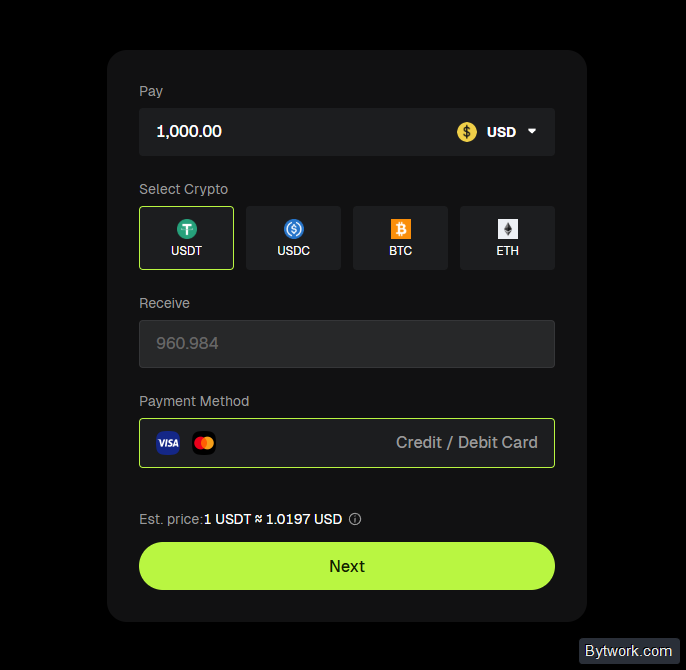
This is an extremely unprofitable method, and it also requires identity verification. To reduce fees, you can buy stablecoins on a regulated platform (e.g., Kraken or Coinbase) and transfer them to Bitunix via the blockchain, and this will cost almost nothing. However, Coinbase and Kraken do not operate in all regions.
After depositing, you can start trading.
How to start trading?
First, you need to decide on the type of trading: spot, futures, or copy trading.
- If your goal is to simply buy a coin, hold it, and then sell or transfer it, choose spot. This is a "buy-sell" type of trading.
- For active trading with margin and leverage, choose futures. This is a risky type of trading for pros.
- And if you want to copy the trades of other traders, then copy trading is for you.
Beginners should start with spot trading. It provides direct ownership of real assets with the ability to withdraw to cold wallets, eliminating the liquidation risk inherent in leveraged futures.
How to read charts?
The exchange charts work with TradingView, providing you with a full set for technical analysis (Fibonacci lines, RSI, MACD). The chart allows you to add indicators.

The interface allows you to manage trades visually: Take Profit and Stop Loss levels are set by dragging, and positions are color-coded (green - Long, red - Short) with the entry and liquidation price displayed.
The platform supports splitting the screen into up to 16 windows for simultaneous monitoring of different assets or timeframes, as well as flexible appearance settings (grid, background, timeframe list).

For example, you can simultaneously view the 15-min timeframe, hourly, or even the daily chart.
How to open a spot position?
On the exchange, all trading pairs are against USDT. On the left, you can select a pair or view categories such as RWA, TradFi, or simply find ETH.

In the order book on the right, sellers with the lowest ask price are highlighted in red, and buyers with the highest bid price are highlighted in green, forming the spread and the current market price.
There are 3 types of orders
- Limit - the order goes into open orders and waits to be executed at the specified price.
- Market - executed instantly at the current best price.
- And Buy Low / Sell High - executed at the target price when the index reaches the TWAP value for 7:30-8:00 UTC at expiration (with guaranteed yield in the order coin), otherwise the transaction is canceled, but the profit is paid regardless. This type of order is described in the exchange documentation as Dual Investment. We'll look at it below.
Accordingly, the order placement panel is on the right, where you can select these order types, price, quantity, and set TP/SL for spot trading.
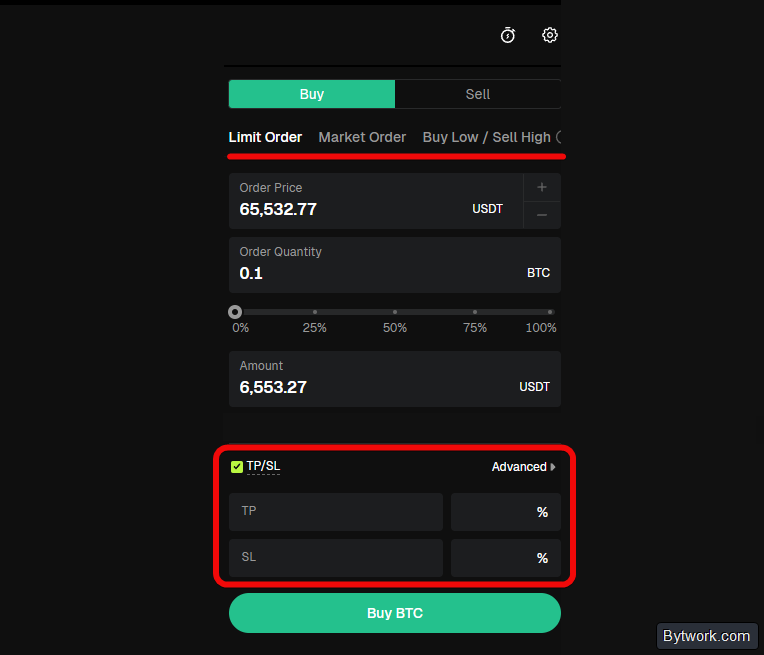
For example, when buying an asset, you can specify a stop loss percentage (e.g., 2% of the amount) in the interface, and the system will automatically calculate the selling price. Stop Loss on spot ensures that if the market goes against you, the position will close automatically, preserving some of your liquidity to re-enter at more favorable prices.
Also, setting limit orders with TP/SL helps you stick to the buy low - sell high strategy, eliminating emotions. This is related to the Buy Low / Sell High order type.
What does the Buy Low / Sell High order do?
Here you lock in a sale of BTC at a target price of 59,000 USDT (for example, the market price is 65,553.9 USDT) with a guaranteed APR of 10.22% until expiration.

If at the time of expiration the price is ≤ 59,000, you will receive BTC + yield in BTC; if the price is > 59,000, you will get back USDT + yield in USDT.
Under the terms of this order, you do not lose the invested amount and are guaranteed to receive a yield of 10.22% per annum, but the price for this is the risk of missing out on profit if the price moves strongly.
For example, if BTC falls significantly below 59,000, you will still buy at 59,000 and immediately be at a loss. In this order, the guaranteed percentage is compensation for the risk of unfavorable execution, not unconditional income.
In summary, you can open a position via limit (specified price), market (current price), or Buy Low/Sell High order (expiration). Beginners usually start with market orders.
Now let's look at working with futures.
How to trade futures?
It is important to understand that futures are designed for experienced traders because they carry risks. Leverage, while increasing profits, proportionally increases losses. Beginners often lose all their capital because of this.
First, you need to understand how leverage works.
How does leverage work?
Leverage (e.g., 2x, 5x, 10x) multiplies the position size relative to collateral. For example, 100 USDT allows you to open a position of 1000 USDT with 10x leverage, proportionally amplifying both potential profits and losses.
What are the losses? For example, with 10x leverage, a 10% loss ($1000) completely destroys the collateral. Leverage amplifies percentage movements both up and down.
Leverage shouldn't be used recklessly. There are professional ways to use leverage and ways to lose everything-we'll show you a more professional approach.
There are different types of collateral: USDT-M, USDC-M, and Coin-M. In the latter, the collateral and profit currency is the base asset itself, while in the first two, it's clear from the name - USDT and USDC.
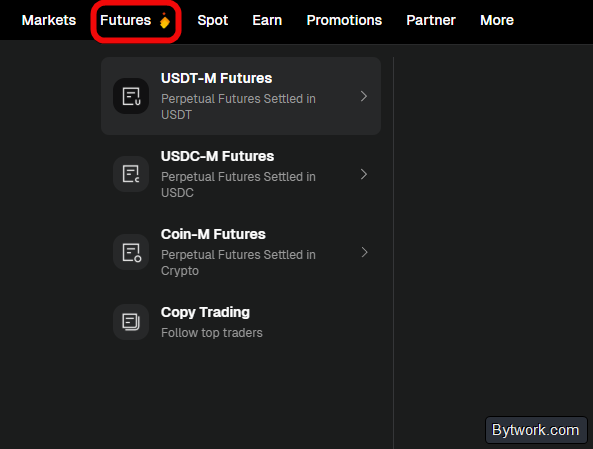
To trade with leverage, first transfer funds from your spot account to your futures account (e.g., USDT-M). Then click Futures, select a trading pair (e.g., BTC/USDT) and use a market or limit order, as before.
Here there is also a trigger order and a trailing stop, allowing you to "drag" profit behind the price.
You will also see the TP/SL settings and the liquidation price. Reaching it means losing your money. Therefore, it is important to be able to manage the position through TP/SL and adding margin.

You will need to set the number of coins and additional parameters, such as the leverage level. It is best to start with 2x or 5x.
Also set the margin mode to isolated (isolated margin). It limits your risk to just this one trade, whereas cross margin risks the entire balance of your account being liquidated. And this is more risky.

It is strongly recommended to use the TP/SL (Take Profit/Stop Loss) option. This allows you to set limit orders in advance to exit the position, both to lock in profits and to limit losses if the market goes against you.
Take profit will automatically close the position at a specified price above the entry point, and stop loss will close it at a loss below the entry point.

If the price moves in your favor, you can manually move the stop loss higher to lock in profit. Stop losses are necessary to limit losses and prevent liquidation.
How to set take profit and stop loss?
To set TP/SL when opening a long position (betting on an increase), use Open Long and set take profit higher and stop loss lower.
If you are opening a short position (betting on a decrease), remember that your take profit will be below the entry point and your stop loss will be above.
You can monitor your open position below the chart and make adjustments, for example, add margin if you are approaching liquidation, or close the position early manually. You can also make changes using the markers on the charts themselves.

You can adjust SL/TP by dragging the stop loss line on the chart or changing it in the settings by clicking the pencil icon.

Remember, according to Coinglass, more than $154 billion in forced liquidations have been recorded on futures, which averages $400-500 million in daily losses.
At the same time, liquidation heat maps allow you to see the market "through and through", understanding where exactly 90% of retail players will suffer losses. This information should be used for strategies, but not rely on just one signal. For example, Pi Cycle Top can help find the peak in crypto, and assess trend strength with RSI in conjunction with divergence, MA, etc.
We also add the TSI indicator to the chart to understand if the trend has real strength and take into account the features of BTC cycles.
Having covered spot and futures, let's move on to copy trading.
What are the copy trading features?
Copy trading is a function that automatically replicates the trades of a selected trader in your account. With it, all actions on the futures market are copied instantly, taking into account your parameters.
The leaderboard features thousands of traders that can be filtered by metrics.

When choosing, we look at the following indicators:
- Choose those who have been trading consistently for several months, not just a couple of days.
- Look for a smooth growth curve without sharp drops or long periods of stagnation.
- A high win rate percentage (e.g., 90%+
Win rate) is important, but it must be combined with the absence of huge losing trades that could wipe out all profits. - Traders working with different assets (BTC, ETH, SOL, etc.) are often more flexible in portfolio management.
However, in copy trading it is important to understand that leading traders receive a reward as a percentage of your profit (usually 10%) if the trade closes in profit. Also, many traders inflate their statistics. Therefore, we have described the principles of how to select traders while avoiding risks in a separate guide on how to start copying successful traders. And although this is using Bybit as an example, the principles are similar on all crypto exchanges.
How to start copying trades?
Having chosen a trader to copy, for example, a person with the nickname Sky, we see that over 30 days he showed P&L +4.6K, a maximum drawdown of 8.89% and a win rate of 98.68% with more than 300 followers.

After clicking Copy Now in the copy settings interface, you will need to enter the investment amount (e.g., 100 USDT) and set a stop loss percentage to automatically limit losses (e.g., 5% or 20% of the amount).

After confirming the parameters with the Copy button, the system will automatically start mirroring the trades of the selected trader in proportion to the specified amount. The status and results of copying can be monitored in the My copies section.

From here you can also stop copying or change settings.
Let's move on to another feature – staking.
What are the staking conditions?
Staking is like an interest-bearing deposit. It is located in the Earn section. There is both fixed and flexible staking.
- Flexible allows you to withdraw funds from staking at any time without losing accrued interest. For example, for ETH, the rate in flexible mode can vary from 1.36% to 9.30%.
- Fixed - funds are locked for a certain period, but often offer a higher rate.

When studying offers for BTC, you may encounter abnormally high numbers (up to 100%), but based on experience, you should only rely on realistic 5% to avoid misunderstandings.
It is important to remember that staking is a risky business. Due to price fluctuations, you can lose money (a price drop can easily outweigh all the profit).
Add to this possible problems with selling new coins and the fact that no one guarantees you income.
Having tried all the exchange functions, let's check the withdrawal of funds.
How to withdraw?
To withdraw funds from Bitunix, go to the Withdrawal section, select the recipient address and network, following the rule: same asset, same network.
Copy the deposit address from another wallet (e.g., OneKey) and paste it for the transfer.

Do not keep large amounts on exchanges - store your assets in your own cold wallet.
What does verification provide?
If you use the exchange only for cryptocurrency trading (deposit and withdrawal via crypto wallets), Bitunix allows you to do this completely anonymously without KYC
Completing verification increases withdrawal limits and allows you to work with fiat currency. The withdrawal limit increases from 500,000 USDT to 2,000,000 USDT.
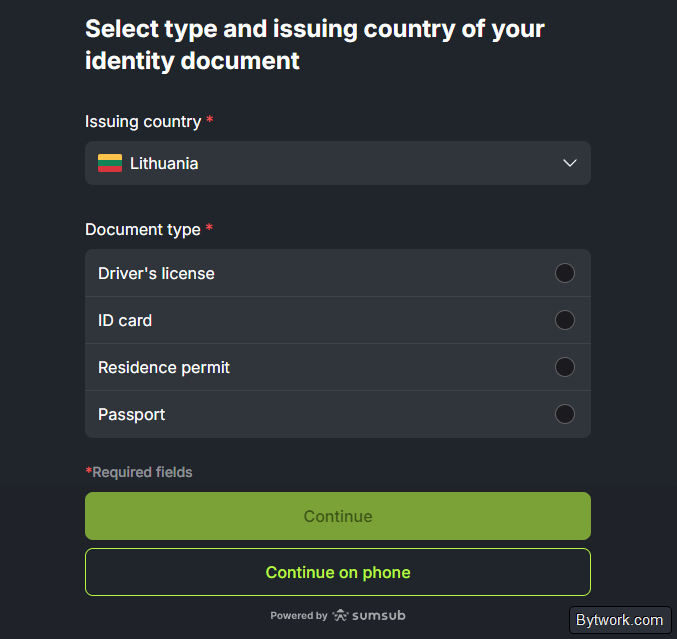
For verification, the exchange will require a photo of a document (passport, ID or driver's license), a selfie, and a handwritten note with the text Bitunix plus the date. The verification process takes up to 4 days.
What are the disadvantages and risks?
Bitunix does not have a built-in demo account for trial trading. For a beginner, entering leverage without a demo account is extremely risky.
Another disadvantage is that you cannot work with fiat currencies (dollars, euros) without passing identity verification.
Users note template responses from technical support and a lack of resolution of blocking issues. Therefore, as always, in crypto you need to test withdrawals on small amounts before starting active trading.
What's the conclusion?
On the one hand, the exchange regularly undergoes various audits, there is proof of reserves on DefiLlama - all this can be checked.
In trading, it's convenient that you can set up sound notifications so you don't have to constantly watch the monitor.
For fans of traditional assets, the exchange also allows trading futures on gold (XAU) and silver (XAG) against USD.
Convenient analysis of market sentiment and sectors is located in the Opportunities section. The platform provides a built-in fear and greed index with daily updates, and also groups tokens by sector (Meme, Layer 1, RWA) showing the average price change, market cap, and trading volume over 24 hours.

These same sectors are used in the Auto-Invest function, where you can choose a ready-made "basket" of assets.
On the other hand, this is a regular centralized exchange with all the ensuing disadvantages: risk of blocking, lack of guarantees, and regulatory risks.
We have been trading cryptocurrencies since 2018 and have tested hundreds of crypto exchanges. Whether to trade on Bitunix or choose another platform from the crypto exchange rating is, as always, up to you. Happy trading! Your editor - Maksim Anisimov for bytwork.com.
This material is for informational purposes only and is not financial advice. We may receive commissions from partners mentioned in the text, but this does not affect the objectivity of our analysis.


