YubiKey 5C with NFC – Review, operating principle, and instructions

You will learn how to secure crypto accounts using the YubiKey 5C NFC hardware key.
What is YubiKey?
YubiKey is a compact device for hardware two-factor authentication, using public-key cryptography to protect your accounts.

What are the problems with passwords?
Traditional passwords are a weak link due to storage on servers (risk of leaks), ease of guessing, and human factors. Passwords do not protect against phishing, SIM card duplication, or data theft via trojans.
A hardware key eliminates these vulnerabilities - it must be physically in your possession to log in. It cannot be hacked remotely!
How does YubiKey work?
When connected via USB or NFC, the key requires a physical touch to confirm a transaction or login. The key allows you to access accounts without entering a password, using only the key itself and a PIN.

Additionally, YubiKey "knows" which website it is bound to. If you accidentally visit a fake (phishing) copy of a site, the key simply won't work and won't transmit passwords to scammers.
Technically speaking, YubiKey works with FIDO2 and WebAuthn protocols. Passwordless login is used for Google, Microsoft, Apple, banks, and corporations. Here is a list of supported services for protection.
How secure is YubiKey?
YubiKey's security is considered one of the most advanced in the consumer cybersecurity market. Why? Because it shifts protection from a purely digital realm to a physical one.
Unlike passwords or SMS codes that can be stolen remotely, YubiKey requires physical possession of the device. Authorization requires your personal involvement.
Your data inside the chip is protected from extraction. YubiKey has no backup function - keys cannot be cloned or restored via a passphrase. This prevents the creation of hidden copies or backdoors.
Cryptographic architecture:
- YubiKey works without a shared secret. The private key is stored only inside the chip.
- Secret data cannot be extracted. No backup or cloning - no backdoors for attackers.
- YubiKey 5 series is waterproof and shock-resistant.
- It is self-sufficient. It generates codes without a battery or internet.

Authentication via touch or NFC tag is up to 4 times faster than manually entering a code from SMS or an app. However, there are also drawbacks. We'll look at them below, starting with the practical setup for Windows.
How to set up YubiKey in Windows?
After ensuring that the YubiKey connector is compatible with your device, go to Settings, then Accounts and scroll down to Sign-in options.

Select Security Key, click Manage, and insert the key into the port. When prompted, touch the key. First, set a PIN - at least 8 digits.
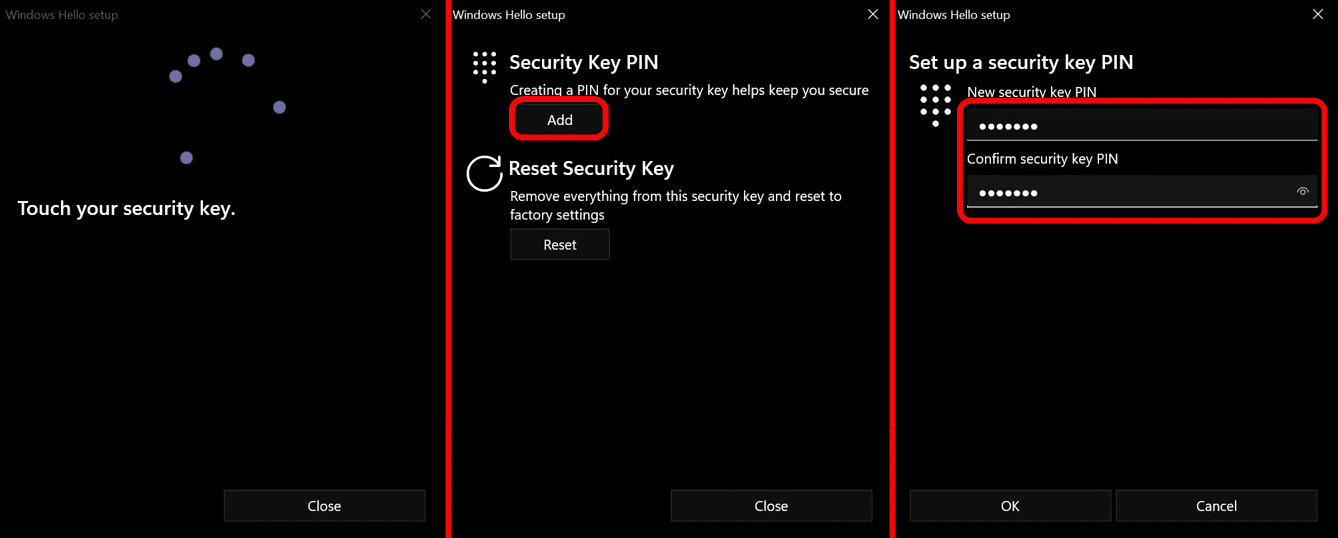
The PIN is a critically important layer of protection: even if the key is stolen, it cannot be used without the PIN. After this, YubiKey can be used to log into Windows instead of a password.
How to protect email accounts?
The next step is protecting email accounts, especially Gmail. This is because a compromised email gives an attacker access to all services via password reset.
How to protect Gmail?
After logging into Gmail, click on the profile icon and go to Manage your Google Account. Then select Security → Passkeys and security keys. The system will ask you to sign in again. Click Create a passkey.

Important: do not save the key on the PC itself and do not use a password manager - select the option Use another device.
Enter the YubiKey PIN and touch the key. After adding, rename the key, for example, to YubiKey 5C.

Repeat the process for another Gmail account if you have one.
How to set up YubiKey on crypto exchanges?
Now let's move on to crypto exchanges. Which exchanges support login with YubiKey?
|
Exchange |
YubiKey support features |
|
Bybit |
Supports YubiKey for 2FA during login and financial operations. You can add up to 5 keys to one account. Available only on PC (requires USB port) |
|
OKX |
Supports FIDO2 protocol for passwordless login with biometrics or a physical security key, including YubiKey |
|
Coinbase |
Recommends using hardware security keys instead of SMS authentication. |
|
Binance |
Supports YubiKey as one of 3 2FA methods (along with SMS and Google Authenticator). Recommended as one of the most secure ways to protect an account. |
Setting up for Coinbase
In Coinbase, click on the profile icon → Manage account → Security → Two-step verification. Select Add a security key and confirm the action via an already configured 2FA method (Google Authenticator or SMS).

Click Start registration, ignore the password manager prompt, touch the YubiKey, and the key will be successfully added!
Setting up for Kraken
For Kraken, the sequence is similar: go to Profile → Security → Add a passkey. Confirm the operation via authenticator, click Add passkey, do not use a password manager, touch the key, enter the PIN, and touch again. The key will be added. How to test it?

Testing it is simple: log out of your account and log in again with your username and password. When prompted for a passkey, select Security key, touch the YubiKey, enter the PIN, and touch again:

Access will be granted instantly.
Advanced usage
Advanced use of YubiKey goes beyond simple 2FA authentication. It includes deep customization of the device for professional tasks and long-term security planning. This includes planning for situations where you might not be able to use the key, and OpenPGP technologies.
OpenPGP and static passwords
These features are available in the YubiKey 5 Series. They are suitable for those working in complex IT environments and valuing privacy.
OpenPGP technology encrypts and signs emails and files. With it, you protect access to servers via SSH. The cryptographic key is generated inside the YubiKey chip and never leaves it. Even if the laptop is compromised, the server remains inaccessible. This feature is absent in the simplified Security Key and Bio series.
To generate GPG, use gpg --expert --full-gen-key, then transfer subkeys to YubiKey with the command gpg --card-edit → keytocard.
Static passwords, on the other hand, store a highly complex password of up to 200 characters. When the sensor is touched, the key emulates a keyboard and "types" this password into the input field. This protects in services that do not support modern standards. The password does not enter the clipboard, and spyware cannot intercept it.
To set up a static password, use Yubico Authenticator. Select a slot (1 or 2), specify the keyboard layout (e.g., US/RU), generate or enter a password (up to 38 characters).

However, remember about security - if the window focus changes while pressing YubiKey (e.g., a chat message arrives), the password might end up in the wrong place and be sent to the chat. Also, if the key is stolen, an attacker could simply press and hold the button to reveal the password.
Strategic planning
YubiKey does not support backups. Losing the key could permanently block access to your assets for your entire family.
A plan must be prepared in advance. Teach your loved ones - spouse and children - how to access the funds in case you are unable to do so yourself.

Show your family where the keys are stored and how the platforms work. Write down instructions offline. For example, use an old film video camera - this way crypto asset data won't end up in the cloud and leak to hackers. This minimizes risks and preserves access for you and your family.
Now let's look at the drawbacks.
Risks and drawbacks
Looking at the device from all angles, we must also note its downsides. Using YubiKey means facing a number of risks and inconveniences that you need to be prepared for. The key is not the most convenient, it doesn't work with all services, and losing the key leads to complete loss of access.
Lost key - lost access
This is the biggest risk. YubiKey has no recovery or backup function in the usual sense. If you only had one key and you lose it, you will permanently lose access to your accounts.

The only way to hedge your bets is to buy at least 2 (or better 3) keys at once and register them everywhere simultaneously. But this can be expensive and time-consuming.
Not compatible with all services
Coinbase or Binance, for example, support YubiKey only in the browser. By enabling this protection, you lose the ability to log into their official mobile apps.
There's also a connector war. USB-A, USB-C, Lightning - one key may not physically fit all your devices.
Limited memory. 5th series devices, for example, hold no more than 25 passkeys and up to 32 accounts in the authenticator app.
Everyday inconveniences
YubiKey requires your physical presence. Forget the key at home - you won't log into work systems. Each key has to be added to each service manually. And size matters! The tiny Nano is easy to lose, while a larger key can be cumbersome when carrying a laptop in a bag.
Risks of buying used keys
Buying keys second-hand (on marketplaces or from third-party sellers) is dangerous. Attackers can buy keys in bulk, open them, inject malware that creates a backdoor, and carefully repackage them for resale. Therefore, it is important to buy keys only from the manufacturer.
No perfect protection
YubiKey brilliantly protects the login process. But it is powerless if your PC is already infected with a virus that steals session cookies from the browser. A hacker can log into the account without even touching the key.
It also doesn't protect against physical theft if the key is stolen along with the device. If an attacker steals the key and somehow learns your PIN and password, access to data will be open. Security in the crypto sphere relies more on protection against fraudulent transactions and hardware wallets.
Alternatives
Let's look at popular hardware keys:
- Nitrokey – an open-source alternative supporting FIDO2, U2F, and OpenPGP. It is suitable for Linux and advanced users, and is cheaper than YubiKey. However, it is not sold in all regions.
- Token2 – a budget option (~$18) with FIDO2, WebAuthn, and TOTP via NFC/USB-C. It is good for everyday use.
- Rutoken MFA/OTP – a Russian analogue of YubiKey 5C and Security Key. It supports FIDO2/U2F, compact models (micro), and is aimed at the local market.
- Thales SafeNet (Gemalto) – enterprise-grade with high security, smart cards, and USB. It is more complex to set up but more reliable for business.
Whether to use YubiKey or not is ultimately up to you, as always. We have reviewed over 120 articles on security, be sure to check them out.
May your security be unshakable, especially in the crypto environment! Your editor - Maxim Anisimov for bytwork.com.
Disclaimer: all information provided in this article should not be taken as financial advice! The article was created for educational purposes. Never invest more than you can afford to lose, and seek advice only from your personal financial advisor.

Now reading


In DePin, people create networks themselves, share traffic or capacity, and receive rewards in tokens from these projects.





The Ellipal firmware update enhances security (fixes vulnerabilities), adds support for new cryptocurrencies and tokens, and optimizes the interface and operational stability.


