A complete guide to Bybit trading bots: how to set them up and what are the risks?

Trading bots on Bybit operate 24/7, automatically executing your strategies. In this guide, you'll learn about 5 types of bots: for sideways markets, averaging, and loss recovery. You'll find out which bot suits your strategy and how to set it up in minutes. We'll also cover risk management and compare bots across exchanges. So, let's get started.
Why use bots?
A trading bot is an automated system that executes trades on its own without your involvement. You just input the settings, and voilà – trades start opening and closing automatically.
If you thought there was some artificial intelligence here that’s smarter than a human, that’s not the case. Such a bot simply doesn’t exist anywhere – otherwise its owner would be the richest person in the world. Bots follow a clear logic: they carry out your instructions to buy and sell assets 24/7. This removes emotions and fatigue from the equation.
It’s important to understand that a bot is not a magic wand. A bot merely automates your strategies. It doesn’t come up with anything on its own.
An important warning must be made. Bots are not a risk-free strategy. This article is not financial advice. Cryptocurrencies involve high risks, including the complete loss of funds. Only invest money that you are morally and financially prepared to lose, without harming your well-being. Also, be ready for temporary drawdowns – emotional detachment increases your chances of long-term success.
Let's start by breaking down the differences between 3 bots: neutral, long, and short.
3 types of bots: neutral, long and short
When creating a futures grid bot, there are 3 types:
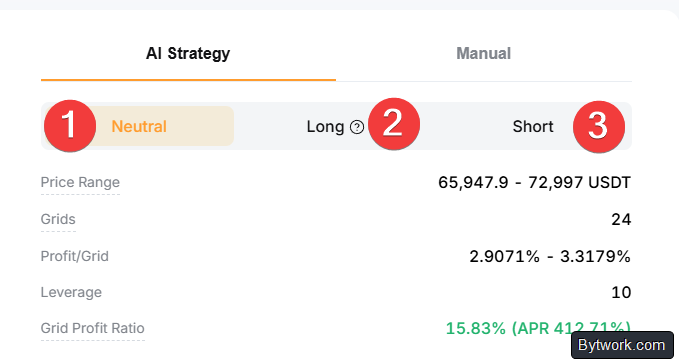
- Neutral – trades are placed both long and short. This is the most profitable bot.
- Long bot – the bot places trades only on the upside.
- Short bot – the bot opens trades only on the downside.
Each of these bots requires its own strategy and market conditions. Let’s look at examples of how the most profitable and most complex to understand – the neutral bot – works.
How does a neutral bot work?
A neutral bot opens both long and short positions. But how does it know what and when to open? Let’s examine the grid, range, and boundaries.
What is a grid?
A grid is a visual representation of how the bot places multiple horizontal levels (lines) that form a kind of network or lattice.

Imagine the price of a hypothetical coin is $100. We open (create) a bot with 5 grids. Grids are the range where a trade will be executed. The number of grids can be chosen from 2 up to a certain number, depending on your funds and the selected range. Range – the boundaries within which the bot will operate – must be set. In our example, the lower range is $85, the upper $110.

When creating a bot, you may notice red, yellow, and green lines. What do they mean?
- Red line means a sell will be executed here.
- Yellow line is like a zero point – the interval between lines is measured from this line.
- Green lines are where a buy will be executed.
Now imagine the coin price starts moving down. As soon as it reaches half the interval, the yellow line jumps one level lower, and there are more red lines. This signals that it’s time to open a long position because the price is approaching our yellow line from above. Where the green line used to be, now it’s yellow. Once the price reaches the yellow grid line, the bot makes a purchase:

Now we have 2 scenarios:
- first – if the price goes down from this point,
- and second – if the price goes up.
If the price continues to fall, the same thing repeats from the yellow line: it jumps again, and we open another long position. So we already have 2 open long positions, which will remain open until the price reverses and goes up. Then our positions will close.

But if the price reverses and goes up to $100, we will close the long position and take profit.

Suppose the price continues to rise to $105 (from below to above), that signals opening a short position. If the price goes even higher, only short positions will be opened, as you might guess.

And when the price reverses, those positions will be closed. For our short position opened at 105 to close, the price must drop to $100.

One successful trade equals one interval. Now you understand: the neutral grid bot works best in a range – a corridor where price moves up and down. That’s the ideal chart for such a bot.

The neutral grid bot is only effective as long as the price stays within the set upper and lower boundaries. And the more grids you have, the more frequently trades will occur in a narrow corridor, but this reduces profit per trade and may increase commission costs.
It’s important to understand that grid strategies are least effective during strong parabolic rises or falls, because the price quickly moves outside the range and the bot stops trading.

It is extremely important to note that you need to open a neutral bot in the middle of such a corridor and also close it there. If you miss the closing, you’ll fly into a big loss!
Grids can be geometric or arithmetic:

The differences are shown in the table below:
|
Characteristic |
Arithmetic Grid |
Geometric Grid |
|
Distance between levels |
Equal in quote currency (e.g., +10 USDT) |
Equal in % (e.g., +1%) |
|
Profit per grid |
Floating (decreases as price rises) |
Fixed at each step |
|
Market conditions |
Moderate volatility, long bias |
High volatility, short/bearish bias |
|
Asset quantity |
Same number of coins per order |
Same dollar volume per order |
Experienced traders prefer the geometric grid for its purity – it divides orders more logically across the entire range and helps maintain stable returns over long distances.
Now let’s go over the long bot.
Long bot
This one is much simpler, and the principle is somewhat similar to a spot bot. This bot works best in bull markets, i.e., when the coin price is constantly rising.
- If the price goes down and reaches the yellow grid line, it opens a long position (betting on a rise).
- If the price goes further down, it opens more long positions.
- If the price later reverses, it will close all those positions.

When opening such a bot, we automatically open several positions if the opening price is below the upper range boundary. If after opening this bot the price immediately goes up, the bot will start closing the existing positions that were opened at the start.
These positions are opened in a percentage proportion depending on where the bot started working:
- if exactly in the middle, it’s 50/50 (50% of your capital will be in open positions);
- if somewhere lower, e.g., 70/30, then naturally 70% of your capital will be in open positions.
You can see this in detail when we actually open such a bot. In a bear market, you should not open such a bot – you’ll drive yourself into losses!
Short bot
As for the short bot, the principle is exactly the same as the long bot, only mirrored. And as you might have guessed, this bot works best in a bear market, when the price is constantly falling.
All the same conditions, except the bot opens short positions (betting on a decline):
- if the price goes up, it opens a position,
- and when the price goes down, it closes it.

Again, existing positions will be opened in a percentage proportion – simple. In a bull market, such a bot will operate at a loss.
Now before setting up a bot, let’s look at the types of bots available.
What types of bots are there on Bybit?
Bybit offers 5 types of bots, each designed for a specific trading style.

- Futures Grid Bot – used for volatile markets. It profits from price fluctuations by placing buy and sell orders within a set range. Carries high risk and liquidation threat.
- Futures Martingale – designed to quickly recover losses. It increases position size as price falls and takes profit when the market bounces. Also a risky bot.
- Futures Combo Bot – the riskiest one. Automatically rebalances a portfolio of three coins. Funds from profitable positions are moved into losing ones to support them.
- Spot Grid Bot – safer because it uses no leverage.
- Finally, DCA Bot – one of the most reliable strategies. The bot regularly buys coins regardless of price, helping to smooth out volatility and accumulate a position at a good average price over the long term.
How to start using bots?
In the top menu, select Trading Bots. This is your bot control panel. At the top, you can see total capital, current profit and loss, and the number of active bots.

Scroll down the page – you’ll see the Match function. This is the fastest way to create a bot. The AI will recommend the best bot, specifying type, direction, leverage, APR, and drawdown.
You need to select a trading pair, trading type, and market direction (bullish or bearish).

This isn’t a bad option if you need a working bot in under a minute.
Below that, you’ll also see bots recommended by AI, and further down a ranking of the most popular bots. You can sort this ranking and choose a bot you like. If you want to copy such a bot, just click Copy, and the bot’s settings will be copied for free on the coin it trades.

However, copying someone else’s bot settings is a lottery. You’ll launch the bot much later than its author, so the conditions will be different, and you might even end up with a loss. If you want more control and understanding of what each bot does, keep reading – we’ll cover all bot types in detail.
How to create your own futures grid bot?
Click Create for a futures grid bot and select a pair (e.g., BTCUSDT).

On the page, you’ll see ready‑made bot selections from Aurora as a reference. On the right, you have a choice: AI strategy (AI sets direction, range, grids, leverage; you only specify the investment amount) or Manual mode (set all parameters manually).
Let’s set up our bot manually.
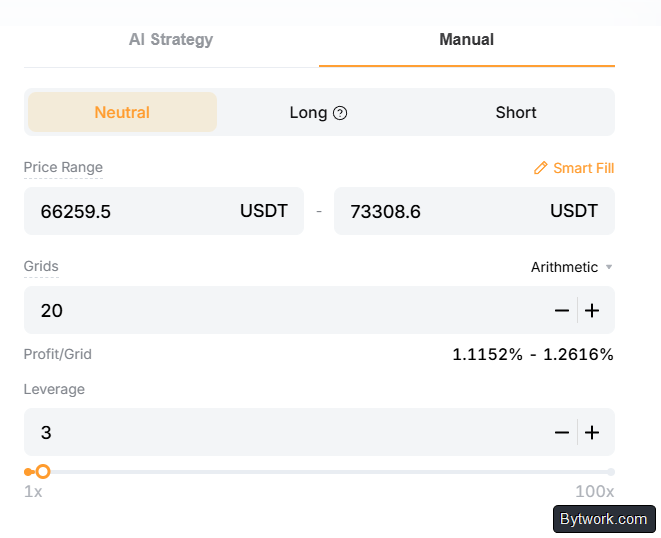
What should a beginner specify?
- Mode –
Neutral(if there is no clear price trend). Price Range– a wide range (with a buffer of 10–20% from the current price on both sides).Leverage– no more than 3x‑5x to start.Grids– the more grids, the more frequent trades, but the lower the profit per trade (Profit/Grid). Usually set so thatProfit/Gridis around 1.1% – 1.2% (after fees).
Why? If you have too few grids (below 0.4%), the bot will trade too often, and you’ll be working for the exchange, giving away a huge portion of profits as fees.
If you have too many grids (above 2‑3%), the profit per trade is large, but the price may wander within a single grid for weeks without closing trades. The bot will just sit idle.
Below are advanced settings available in both AI and manual modes:
- Entry price – the bot activates when the specified price is reached. If not set, it starts immediately at market price.
- Trailing Stop – if the market moves sharply against your strategy (e.g., you are long and price crashes), Trailing Stop will close the bot when the price falls by the specified percentage from the local high. This protects against liquidation during sudden crashes.
- Trailing Up / Trailing Down – moves the grid. Helps the bot stay within the range during strong trends and continue trading. As a beginner, you can leave this off for now.
- Stop Bottom Price (if you are long) – set a price slightly below your lower grid boundary. This will save you from full liquidation if the coin starts falling into the abyss.
- Stop Top Price – the price at which the bot forcibly closes if the market has flown too high.

It’s important to note that Trailing Down can sometimes be dangerous. Trailing Down allows the bot to follow a falling price, but it can lead to buying all the way to zero. The bot will keep buying the falling asset, using all available margin from your balance.
We’ve set up a spot grid bot. Now let’s go back to the bots. Next up – futures martingale.
How to create a futures martingale bot?
This bot is designed to quickly recover losses by averaging the price as it falls and taking profit on a bounce. It is used in volatile markets.
Click Create on the Futures Martingale option. You’ll see settings similar to the futures grid bot, but with a few differences:
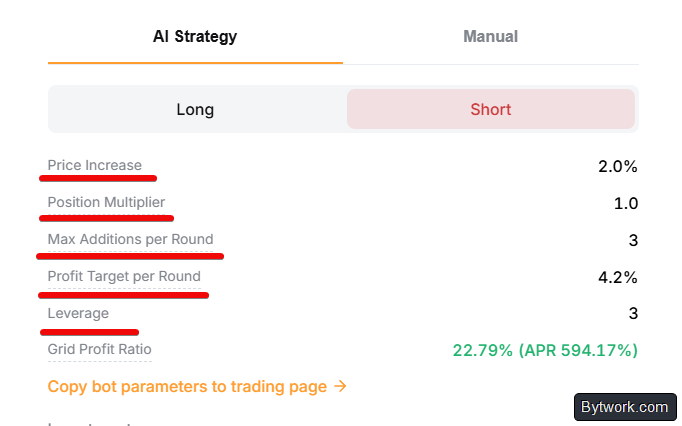
Price Increasedetermines how far the price must move before taking profit.Position Multipliercontrols how much larger each subsequent buy order becomes as the price falls.Max Additions per Roundis the maximum number of times the bot can increase the position.Profit Target per Roundsets the % profit the bot aims to achieve before closing the trade.Leverageworks the same as before – start with a low value if you are a beginner.
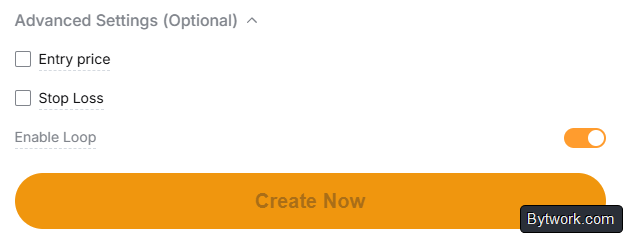
In advanced settings, you can set the entry price and stop‑loss. You can also enable cycle mode. When activated, the bot automatically starts a new cycle after reaching the target profit.
If you want more control, switch to manual mode and set everything up yourself.
How to know when to use this bot? For example, if RSI is in the oversold zone, that could be a signal to launch a Long bot or Martingale to play a bounce.
When you’re ready, enter the amount and click Create Now.
Using the example of the Mantle (MNT) coin, with a deposit of 200 USDT and 3x leverage, the bot settings include a buy‑the‑dip threshold of a 10% price drop, a target profit of 5% per cycle, and up to 6 replenishments per period. With these conservative parameters, there is no liquidation price, and the bot automatically starts a new cycle after reaching the target.
How to create a futures combo bot?
The futures combo bot is unique because it supports automatic rebalancing of a portfolio of several coins. This approach works in any market conditions thanks to diversification.
First, select the market direction: long, short, or mixed. Then choose a category (DeFi, Memes, Innovation, Metaverse, etc.).

Bybit will show portfolios of 3 coins for that category, and you can modify the settings for each coin.
If you switch to manual mode, you get even more control:

- choose the direction for each individual coin (long/short),
- set the weight and allocation for each asset in the portfolio,
- add or remove contracts (up to 10 different coins supported),
- set leverage for the entire portfolio and choose the rebalancing method: threshold‑based (rebalance when allocation deviates too much) or time‑based (rebalance at fixed intervals).
In advanced settings, you can add a trailing stop, take‑profit, and stop‑loss for the entire portfolio. After everything is set and you’ve entered the investment amount, click Create Now.
How to create a spot grid bot?
The spot grid bot works the same as the futures grid bot, but without leverage. It is suitable for automatically buying low and selling high in a sideways market without liquidation risk.
First, it’s important to identify a sideways market. Use candlestick analysis or Heikin Ashi for that.
Select a trading pair, e.g., ETHUSDT. Use the AI strategy or manual mode as before.
The key difference is the absence of leverage, so you trade only with your own funds. Set the price range and the number of grids. The bot will place buy orders near the lower range boundary and sell orders near the upper boundary, capturing profit from each price fluctuation.

This is an excellent way to accumulate a position over time without using leverage. Once you’ve finished setting up, enter the amount and click Create Now.

Backtests show that a bot with 25 orders often outperforms a bot with 80 orders over the same period due to significant savings on commissions.
How to create a DCA bot?
The DCA bot is suitable for long‑term investors who want to buy regularly regardless of price, averaging their cost. Here’s how it works. First, choose the cryptocurrency you want to invest in. You can add multiple coins if desired. Then set the investment frequency: every 10 minutes, every hour, daily, or weekly.

Finally, enter the amount – this is the amount the bot will invest each time. The bot will automatically buy at the chosen frequency, regardless of price. This removes emotion from the investment process and helps you accumulate assets over time. When everything is set, click Create Now – and the bot takes over.
Where to see bot statistics?
At the top, you can see total capital, current profit and loss, and the number of active bots.

Click on the number of bots or go to the dashboard. Here you can view bots, edit grids, stop bots, and withdraw funds.
Consider our example. The bot has been running for an incredibly long time – over 816 days (almost 2.5 years). This is an example of a long‑term strategy, not quick speculation. The bot has split our capital into 2 parts:

BTC Amount(0.017606) – this is the working material. The bot has already bought this amount of Bitcoin to place sell orders above the current price.USDT Amount(~2676) – this is the free reserve. This money sits in buy orders below the current price.
Below is the order grid (Buy & Sell). This is the bot’s cardiogram:

Buy(Green) – 38 orders. These are levels below the current price. If the price goes down, the bot will buy BTC at those levels (77008, 76549, etc.).Sell(Red) – 49 orders. These are levels above the current price. As soon as the price rises to these levels (77928, 78388, etc.), the bot will sell some BTC and lock in profit.
There is an option to modify the grid. As the moving average (SMA) rises, you need to raise the bot’s lower limit (if the Trailing Up function is not enabled) so that capital is concentrated in the current volatility zone.
And although bots can trade profitably, past success does not guarantee future profits.

Significant drawdowns also occur. Let’s examine the risks and disadvantages of all these bots.
What are the risks and disadvantages of bots?
Trading bots on Bybit carry serious risks. You may experience a significant portfolio drawdown or lose all your funds. Futures bots, in particular, can liquidate your deposit. With 10x leverage, a 10% drawdown wipes out the deposit.

Most bots operate within a static price range. If the price breaks the lower boundary and continues to fall, the bot simply buys the asset with all funds. Trading stops, and you’re left with a depreciating coin.
In contrast, a spot bot does not get liquidated at all. But during a sharp market crash, it will buy the asset at high prices. In the worst‑case scenario, you end up with cryptocurrency that is 80–90% cheaper. Consequently, you’ll have to wait years for the cycle to recover.
What about AI? AI strategies like Aurora AI are deceptive. Essentially, they are manipulations by the exchange to encourage more trading by showing high percentages. They rely on history where success was achieved with leverage up to 50x. Any change in the market would destroy such a deposit.
Finally, in a parabolic rise, the bot underperforms simply holding the asset. It sells coins too early at each level, locks profit in stablecoins, and misses the main upward move.
Now let’s compare bots across different exchanges.
What’s the difference between bots on Bybit, MEXC, and Binance?
We decided to run a test, comparing Bybit’s futures grid bot with a similar bot on MEXC, as MEXC is known for the lowest commissions.
At the beginning of this test, the MEXC bot led, showing better results. Then the BTC price started to fall, and the Bybit bot showed better results. At certain moments, MEXC pulled ahead again, and so on, alternately. However, in the end, the MEXC bot was liquidated with a 100% loss, and the same happened to the Bybit bot – all funds were lost.

All funds were lost, and we say this honestly. To give you a general idea of previous trades: initially, these bots worked great, making hundreds of trades and consistently locking in small profits – buying at lows and selling at highs over and over. Both bots performed well. But then something happened that hadn’t occurred since 2018: Bitcoin printed 4 consecutive monthly red candles, meaning the price fell for 4 months in a row.
The first lesson you see with your own eyes is that even if your bots start out well, they can eventually be liquidated if you use futures.
If you compare this to the DCA bot we mentioned earlier, being in the red is not necessarily bad, because when your DCA plan is at a loss, it means you are getting more BTC – the price is lower and cheaper. With each purchase, you accumulate a little more Bitcoin, which could be a blessing in the long run.
However, with a futures grid bot, there is no such advantage – you simply lose funds, and the game is over. These are completely different mechanisms. This example shows that futures bots carry much higher risks, and you should not invest anything you are not willing to lose.
On Binance, there is the TWAP bot. It splits a large order into many small ones and executes them evenly over a set time (e.g., 12 hours) to get a price close to the average. The POV bot on Binance adjusts the order execution speed to the current market volume (% of total trading volume). This is useful for very large positions. Otherwise, everything is the same.
Final comparison:
|
Characteristic |
Bybit |
Binance |
MEXC |
|
Strengths |
Best returns in tests, Aurora AI strategies |
Maximum liquidity, best conditions for DCA |
Lowest fees in the industry |
|
Unique bots |
Futures Combo |
Algo bots (TWAP, POV) |
Standard set (Grid) |
|
Entry threshold |
Depends on number of grids |
From 0.1 USDT for DCA |
Low thanks to small fees |
|
Risks |
High on futures with leverage |
Standard market risks |
Possibly deeper drawdowns during crashes |
The point is that trading bots are not magical tools for guaranteed profit. They strictly follow your programmed algorithms. The trader’s job is to manage risk.
How to manage risks?
On Bybit, when you launch a bot, 100% of the funds are reserved (half for the position, half in limit orders). Unlike other exchanges and bots, margin is not deployed gradually.
Therefore, you need to follow a collateral strategy. Divide your capital into working deposit and margin. For long‑term trading with 3x leverage, use a 3:1 ratio (investment to additional margin). This pushes liquidation to unlikely levels. Margin can be added or withdrawn manually.
Use services with liquidation heatmaps to better understand the market. For safety, it is also important to use protective orders:
- Stop-Loss – automatically closes positions when a loss level is reached. Place it outside the trading range (below the lower boundary for a long). Without a stop‑loss, a sharp market move could result in a 60‑100% loss of deposit!
- Take-Profit – locks in profit at a specified price or percentage. Fibonacci levels can help determine the upper range boundary where the bot should finally exit into stablecoin.
- Trailing Stop – a dynamic stop that follows the price in the profitable direction. When the price falls by a set % from the peak, the bot closes.
- Trailing Up/Down – allow the grid to follow the trend. Caution: Trailing Down in a falling market can lead to endless buying and margin exhaustion!
- Entry Price – entry not immediately, but when a specified price is reached (e.g., on a pullback).
Final checklist: leverage 2‑5x + always a stop‑loss on futures. On spot, the risk is lower – no liquidation. But volatility remains.
Conclusion
So, now you know how to use each trading bot on Bybit. Whether you want to profit from volatility with grid bots, recover losses with martingale, diversify with combo bots, or simply accumulate assets with DCA – all the tools are in your hands.
The neutral futures grid bot on Bybit opens long and short trades when the price moves within a set range (e.g., 85–110 $), with 30 to 50 grids for moderate volatility and a profit per closed trade of 0.03–0.2%. Take as little leverage as possible – from 1 to 5 (optimally 3). Better yet, open several bots for diversification. Allocate 5‑10% of your deposit per bot – you can have up to 20 bots running simultaneously.
Bybit offers ready‑made AI strategies or you can choose manual setup. In manual mode, click Smart Fill – the AI will automatically select parameters. There are also Aurora AI recommendations, but personally, we do not advise using them, as they often target short positions and may have an incorrect price range.
Pavel Grachev, specially for bytwork.com.

Now reading


In DePin, people create networks themselves, share traffic or capacity, and receive rewards in tokens from these projects.