Solflare Wallet: Extension review, funding, installation, and staking

A hot wallet is inherently more vulnerable to hacking. Security audits haven't been published. Furthermore, it's on the same network.
Transaction simulation, anti-phishing, burning of spam NFTs with SOL return, temporary Burner wallets.
Overview
Solflare wallet is specifically designed for the Solana blockchain. Besides Solana itself, you can store USDC and USDT stablecoins, JUP (Jupiter), Bonk, Pump tokens, and others here. It also supports wrapped assets like Wrapped Ethereum (WETH) and Wrapped Bitcoin (WBTC) within the Solana network.
Wrapped tokens are the equivalent of original tokens operating on the Solana network. The developers consciously chose not to make the wallet multi-chain to support all the features of a single ecosystem as efficiently as possible.

The interface is similar to other browser wallets like Phantom, MetaMask, and Rabby Wallet.
Wallet Features
In addition to storage, exchange, and staking options, it includes functions for working with NFTs, Earn, and prediction markets.
The Predictions feature is an integration with the regulated Kalshi prediction exchange via the DFlow protocol. This allows you to trade directly on the outcomes of real-world events (sports, politics, economics). Essentially, it's similar to Polymarket, but on the Solana blockchain.

Here, you make a prediction on an event with YES or NO options. Each contract (a token for the Yes or No outcome) costs between $0 and $0.99 in USDC and pays out a full $1 if the prediction is correct, or $0 if the outcome is wrong.
The Stocks feature allows you to buy and sell tokenized versions of real US stocks directly within the wallet. These are not actual stocks, but crypto tokens on the Solana blockchain that track the price of their stock market counterparts, similar to how stablecoins track fiat currencies.

Available stock tokens include TSLAX, NVDAX, AAPLX, SP500, and others (over a dozen).
The Earn feature is designed to generate passive income from your crypto assets. It offers not only SOL staking but also investments in USDC.

This is an analogue of a savings account on the blockchain for generating predictable income without cryptocurrency volatility. We'll look at all the risks and conditions below.
Finally, the Explore feature is designed for discovering trends, new tokens, meme coins, swaps, and Solana dApps with one click.

Here you'll find a catalog with DeFi categories and Web3 applications.
What security and features does it offer?
With Solflare, you own the recovery phrase for accessing your funds, meaning it's a non-custodial wallet.
Security:
- Secret Recovery Phrase – this is the master key to your digital safe. It provides access to all your funds.
- Local password protection (or PIN code on mobile) secures your wallet from unauthorized access.
- Biometrics - on smartphones, you can enable login via fingerprint or FaceID.
Additionally, Solflare directly integrates with hardware wallets like Ledger, Keystone, and its own solution - Solflare Shield. This is their portable hardware wallet in the form of a card (no batteries or Bluetooth), which uses NFC for signing transactions.

Additionally, we should note the built-in security mechanisms.
Built-in Protective Mechanisms:
- Transaction simulation - before confirming an operation, the wallet shows what changes will occur to your balance. This helps avoid signing malicious transactions.
- Anti-phishing - the system warns you when interacting with known fraudulent sites or suspicious smart contracts.
- Spam burning - you can remove (burn) fraudulent NFTs and tokens sent by attackers. This action often allows you to recover a small amount of SOL that was locked to create the token's account.
- Burner wallets – disposable wallets for interacting with untrusted applications.
Here you can quickly create a temporary disposable wallet for interacting with untrusted dApps or NFT mints to avoid risking your main capital. These temporary wallets are called Burner wallets.

However, a full public audit of Solflare's core wallet code has not been published. Despite the source code being open, we cannot be completely certain it has no vulnerabilities.
Regarding security in summary: Solflare's own protection mechanisms include the multi-layered Solflare Core system, which analyzes transactions in real-time. It blocks phishing sites and automatically isolates spam tokens to prevent fraud.
How to download and install?
To install, go to the official website's downloads section. Solflare is available for Chrome, Firefox, Brave, Edge, Opera, Yandex Browser, and Arc.
It's crucial to download the correct application, as fraudulent copies exist. Always check the number of reviews and user count.
Here we see over 3100 ratings with an average score of 4.9 and more than 800,000 users – this is a reliable indicator.
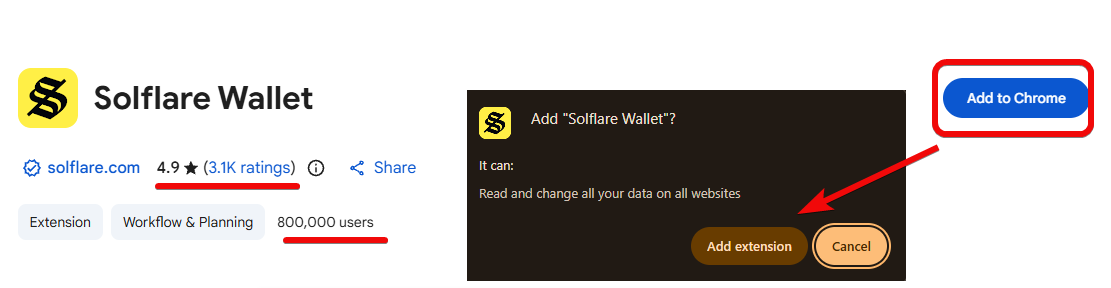
Click Add to Chrome, then Add Extension. The installation will take about a minute.
How to create a new wallet?
After installing the extension, a notification will appear that the Solflare wallet has been added to Chrome, and the setup page will open automatically.
Here you can choose I need a new wallet or I already have a wallet. If you have a 12-word recovery phrase from another wallet, select the second option. To create a completely new wallet, click I need a new wallet.
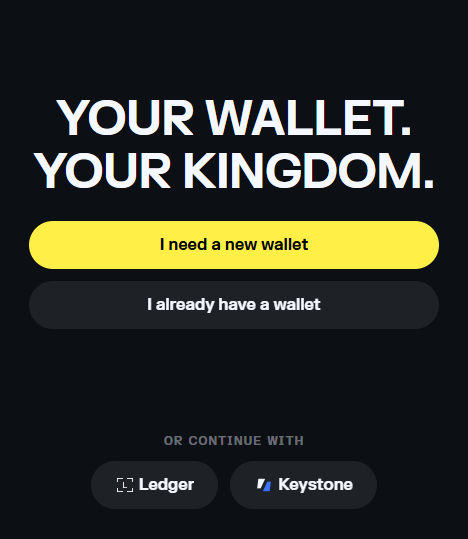
It's best to pin the wallet icon to your browser's toolbar for quick access. After selection, your secret recovery phrase consisting of 12 words will appear. It's extremely important to make copies of this phrase.
How to create a backup?
Write the words of the phrase on paper – this is the most secure method. Never copy it to the clipboard because your computer might be vulnerable to malware.
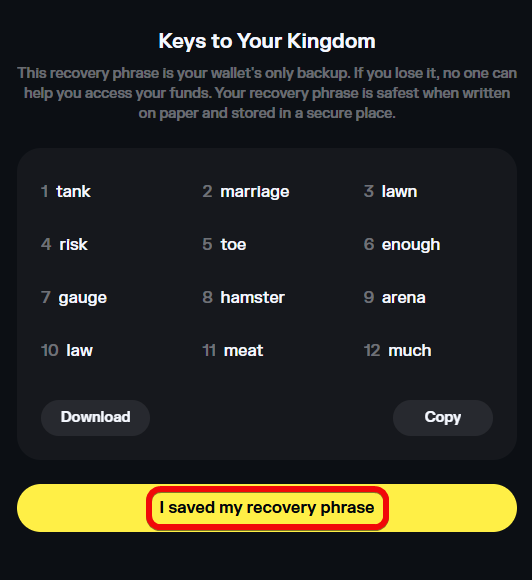
Writing down these words is the most critical step in creating a wallet, as it represents the master key giving full access to all your funds.
If you lose both the phrase and the password, your wallet and assets will be lost forever!
Brief seed phrase security checklist:
- Write it down on paper or steel plates. This protects against digital hacks.
- Never store it on devices, in the cloud, email, or photos.
- Never share or show the phrase to anyone. We revealed ours only for demonstration purposes.
After writing it down, enter the words from the phrase to confirm and click Continue.
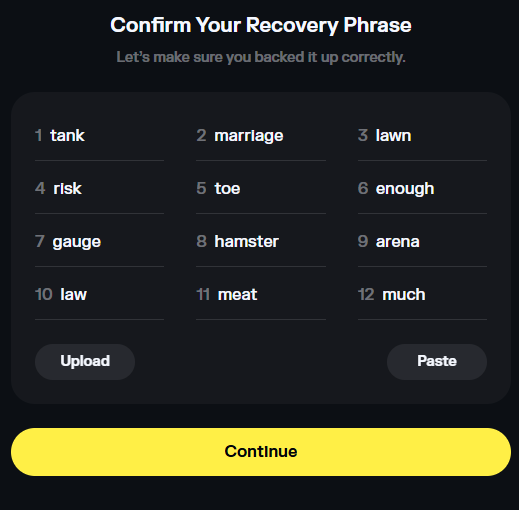
Next, set a password for the wallet. This password protects the wallet from unauthorized access on your PC, but remember: Solflare cannot reset it if you forget. To restore access, you will need the 12-word phrase.
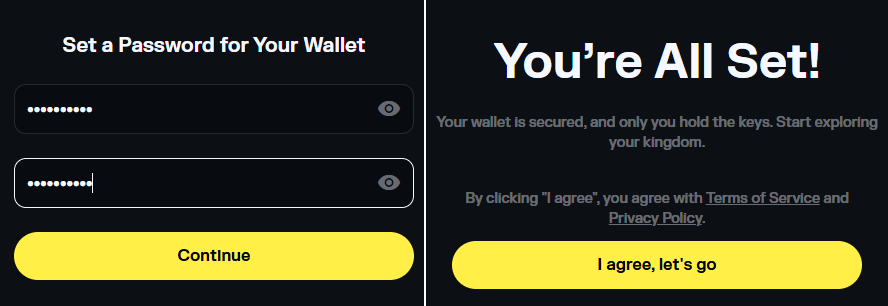
After entering and confirming the password, click Continue.
Skip the promotional screens and close the welcome page – open the pinned wallet widget. You will see your new wallet with a zero balance.
How to use it?
The wallet is available in full-screen and compact views. The main controls are performed via 4 buttons:
Receive– for getting your address and QR code.Buy– for buying crypto via cards.Stake– for locking funds to earn interest.Send– for withdrawing funds.

How to get an address?
To top up or get your address, click Receive. You will see your address and QR code for the Solana network.

Using the QR code is convenient if you are transferring funds from a mobile exchange app – it eliminates errors when entering the address.
For secure fund reception, it's important to remember that this address is only for the SOL network. For example, USDT sent from the Tron network will not arrive.
If you plan to use certain addresses frequently, you can save them in the Address Book in the wallet's settings for quick access.
How to top up?
You have 3 top-up options.
- Direct purchase through the app
You can use the Buy option inside the app. This is a fiat on-ramp service that allows you to purchase Solana directly using Apple Pay or other methods.

However, purchase providers do not operate in all regions.
- Transfer from an exchange
As an alternative, most people use centralized exchanges like Bybit. To do this, simply copy your Solflare wallet address by clicking the Receive button, then paste it into the withdrawal section on your exchange to send tokens to your wallet.
- Transfer from another wallet
For a transfer, copy the address and send some Solana from a wallet like Phantom. After pasting the address and confirming the transaction, the Solana network will confirm it within seconds, and the funds will appear in your Solflare wallet.

Once funds appear in your wallet, you can send, receive, or swap tokens.
How to perform a swap?
For swapping, there's a built-in DEX aggregator that finds the best rates across multiple decentralized exchanges. For example, you can swap Solana for USDC or any other token in the Solana ecosystem. Simply select the token you want to sell and the one you want to buy, enter the amount, and confirm.

For safe swapping, you can also set a slippage tolerance. This protects you from buying an asset at an inflated price due to market volatility or low liquidity.

For example, you can set 0.5% or 1%.
What are the fees?
When using the swap feature directly within Solflare, an additional fee of 0.8% is charged. This fee is added to the aggregator's fees (e.g., Jupiter) and is factored into the final swap amount.
When buying crypto through providers (e.g., MoonPay), fees from those services apply. The fee amount is built into the exchange rate spread.
For other types of operations like staking/Earn, Solflare does not charge a fee.

To manage your expenses, you can track all completed transactions and debits in the Activity tab.
How to withdraw or send crypto?
Sending cryptocurrency is just as simple: copy the recipient's address, click Send, paste the address, select the token and amount, and confirm the transaction.

Fees on the Solana network are extremely low, amounting to fractions of a cent. However, to safely perform transactions (sending funds or staking), it's recommended to always keep at least 0.01 SOL in your wallet to ensure sufficient funds for blockchain fees.
How to earn passive income through staking?
You can stake any amount of SOL, even fractional parts of coins, to earn interest.
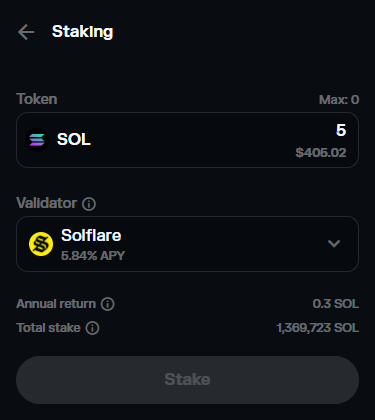
For security, staking can be done in conjunction with hardware wallets (Ledger, Keystone, Solflare Shield). This allows you to store private keys offline while your coins generate income. Importantly, staking (unlike swaps) does not require enabling blind signing on the device.
To stop staking and regain access to your coins, select the active deposit in the staking menu and click Undelegate.

Coins do not become available instantly. The unlocking process takes approximately 2–4 days (depending on the current epoch in the Solana network). After that, they can be withdrawn back to the wallet's main balance.
Besides built-in staking, Solflare offers the Solflare Earn section. It aggregates DeFi yield strategies, allowing you to deposit USDC into lending or liquid staking protocols to obtain higher or insured returns.

Here you have a choice between Max Earn or Insured Earn with different APYs.
It's important to remember the risks of illiquidity, unstable validator yields, and market losses during the unlock period.
How to trade tokenized stocks?
Solflare Stocks allows you to trade tokenized stocks (Tesla, NVIDIA, Apple, S&P 500) and indices directly within the Solana wallet, mirroring real-world prices.
It's important to understand that you are not buying actual company stocks, but synthetic tokens that track their price using oracles. This grants no shareholder rights but allows you to profit from price movements.
How to make a trade?
- Go to the
Stockstab. - Select an asset from the list.
- Click
Swapand enter the amount (SOL/USDC). - Confirm the transaction and the tokens will appear in your wallet instantly.

Technically, these are not stocks but synthetic crypto tokens based on Solana DeFi protocols. They do not grant voting rights, are subject to risks of oracle failures and smart contract bugs, high slippage, and market volatility. Moreover, they lack traditional guarantees and protection from banks or brokers.
How to restore a wallet?
To restore access to your wallet, you need to enter the recovery phrase in the correct order. Let's do this in the mobile version of the wallet.
When creating a wallet, select the Import existing wallet option. Then enter the seed phrase and set a password.

If you already have a wallet in the Chrome extension, you can enter the same seed phrase on mobile to use the same account on both devices.
Mobile app
The Solflare mobile app for iOS and Android offers the same features: SOL staking at 6–8% APY, built-in Jupiter swap, limit orders, support for Ledger and Keystone hardware wallets, as well as an AI assistant and scam protection.

Here, you can pin your favorite tokens to the top of the list by long-pressing. Swiping right opens the receive screen, swiping left allows you to send a token.
What advanced features are available?
Solflare includes a browser function that allows you to manually navigate to any application. For example, you can go to Uniswap, connect your Solflare wallet, and swap tokens there.
In the settings, you can also edit the address book, language, currency, notifications, and security parameters.
Finally, Solflare supports managing multiple wallets (accounts) from a single seed phrase.

You can create separate wallets for different purposes, for example, one for NFTs, another for meme coins. This is more secure than using a single wallet. You can then send tokens between these wallets. The Burner wallet is the highest form of such hygiene, as it's considered expendable. Despite its temporary status, it is still under your control within the same secret recovery phrase if created within the main interface.
For each wallet, advanced options are available: renaming, copying the address, exporting the private key (which grants access only to that specific wallet, unlike the seed phrase which controls all derived wallets).
What are the disadvantages of this wallet?
The drawback is that if you want to use multiple networks, like in MetaMask, this one doesn't support it. The wallet only works with Solana.
Also, due to the specifics of the Solana network, users often receive malicious NFTs and tokens via airdrops. Although the wallet has a function to burn them, it requires you to be cautious not to accidentally click on links in the descriptions of such coins.
Finally, it's a hot wallet operating in a vulnerable environment. Over the past year, 8,058 phishing attacks have been recorded in the Solana ecosystem, with damages of ~$1.1 million.
Conclusion: is it worth using?
This guide covers the basics needed to get started and opens the door to the world of Solana and self-custody of cryptocurrencies. Solflare is a decent option for both beginners and pros.
Using burner wallets along with transaction simulation and spam NFT burning features makes Solflare one of the safest wallets for actively exploring the Solana ecosystem. However, the hot wallet type and lack of code audits remain points of concern.
Solflare's main competitor is, of course, the Phantom wallet. Let's compare these wallets.
| Aspect | Phantom | Solflare |
| Network Support | Multi-chain (Solana, Ethereum, Polygon, Bitcoin) | Solana only |
| Security | Non-custodial, regular audits, Ledger integration, advanced real-time protection - detection of malicious contracts and scam NFTs (by Blowfish), blacklist of phishing sites. | Non-custodial, open-source code, Ledger/Keystone integration, anti-phishing, biometrics |
| Staking | Yes, via validators | Yes, with auto-compounding and analytics |
Both wallets support major hardware integrations, but Solflare offers unique features for wallet "hygiene," such as quickly burning malicious airdrops with a partial SOL refund. You can always easily migrate between wallets using the same secret recovery phrase.
Whether to use this wallet or choose one from our comparison rating - the final answer is always up to you. In the rating, we researched the security of over 100 crypto wallets.
Wallet Support:
Have a great day! Your editor - Maxim Anisimov for bytwork.com.
Disclaimer: All information provided in this article should not be construed as financial advice. The article was created for educational purposes. Never invest more than you can afford to lose, and seek advice only from your personal financial consultant.


