How to use MetaMask wallet. A complete guide - install, deposit, swap

- Hot wallets are less secure
- The interface is slow and overloaded
- Easy and quick setup
- Adding custom tokens
- Advanced gas control
In this guide, you’ll learn how to safely manage assets across Ethereum, Solana, Bitcoin, and L2 networks. You’ll get to grips with hidden features, smart transactions, cutting fees, and protecting yourself from hackers. MetaMask offers more than just an Ethereum wallet-it also provides portfolio tools, staking, dApps, and the ability to manage multiple networks.
Overview
MetaMask is a crypto wallet that installs as a browser extension or a smartphone app. Unlike crypto exchanges, with MetaMask you store your own keys, and you are solely responsible for the safety of your funds (this is called a non-custodial wallet).
With this wallet, you can store, receive, and send funds, swap them, and connect to web3 applications. Web3 is an internet space where you interact with applications for earning, lending, exchanging, etc.
It supports Ethereum, Bitcoin, Solana, Tron, BNB, Hyper, and other networks. It also includes all EVM-compatible networks (Polygon, Arbitrum, Avalanche, etc.). Using the Snaps feature, you can add even more networks.

MetaMask is available as a browser extension on your computer and as a mobile app for iOS and Android. There is also a desktop app, but it's simpler to use the wallet in browsers like Chrome, Opera, and others.
Who is behind this wallet?
Since 2016, Ethereum co-founder Joseph Lubin, through his company Consensys, has been developing MetaMask as a browser extension. The same team is behind the infrastructure tool Infura and the Layer 2 (L2) network Linea. In other words, the wallet has been at the forefront of Ethereum since its early days.
Let's start with the heart of this wallet and the most important thing – security.
What security and features does it have?
MetaMask protects its 30 million users through the Wallet Guard system, which they acquired and integrated directly into the wallet. Wallet Guard analyzes transactions and detects phishing and crypto drainers. Simply put, the wallet warns about fake sites, fraudulent transactions, and displays the terms of transaction signing in plain language instead of incomprehensible smart contracts.
Additionally, for security, it includes a number of features:
Security:
- Secret Recovery Phrase - this is your "master key" to the wallet. Whoever possesses this phrase controls the funds.
- Local access password - unlocks the application only on your device.
- Integration with hardware wallets – in this case, the keys remain on the physical device, and transactions need to be confirmed by pressing buttons.
- Transaction preview - the wallet simulates the transaction execution before you confirm it. This helps you see the outcome in advance and avoid sending transactions that are bound to fail.
All these options already provide a fairly good layer of wallet protection. However, there are also additional security options.
Additional Security:
- Protection against MEV bots, where transactions remain private until they are confirmed on the network. This protects you from bots that intercept your trades and insert unfavorable prices.
- Wallet Guard – translates the technical code of smart contracts into plain language.
- Warnings - if a site or transaction appears suspicious, the wallet will display a prominent warning. This works through the industry-leading cybersecurity company Blockaid.
- Revoke permissions – after connecting to applications, you can manually revoke permissions. This is necessary to prevent applications from executing contracts without your knowledge.
For advanced users, MetaMask also offers multisig accounts. This means a transaction requires 2 out of 3 confirmations from different devices.
Now that we've covered security, let's look at the economic features of the wallet.
Economics and Convenience:
- Trading features - a built-in aggregator finds the best exchange rates among DEXs. The fee for this is 0.85–0.875%.
- Built-in bridges – allows you to move funds from one network to another. For example, from Eth to Linea.
- Staking – the wallet offers built-in interest rates for holding ETH deposits.
- Snaps - a system of third-party plugins. They add support for new blockchains like Cosmos and Starknet, as well as security features, notifications, and chats.
- Futures trading – the smartphone version allows futures trading via Hyperliquid directly in the wallet.
- Web3 browser – allows you to connect to any third-party applications for earning/lending, etc.
Additionally, in a separate Portfolio tab, MetaMask shows all your assets across all networks in one place.
Let's see all these features in practice. To do this, we'll download and install the wallet.
How to download and install?
MetaMask is available as a browser extension on PC and as a mobile app for iOS and Android. We'll focus on the browser extension, which is compatible with Chrome, Firefox, Brave, Edge, and Opera. However, the app is almost identical.
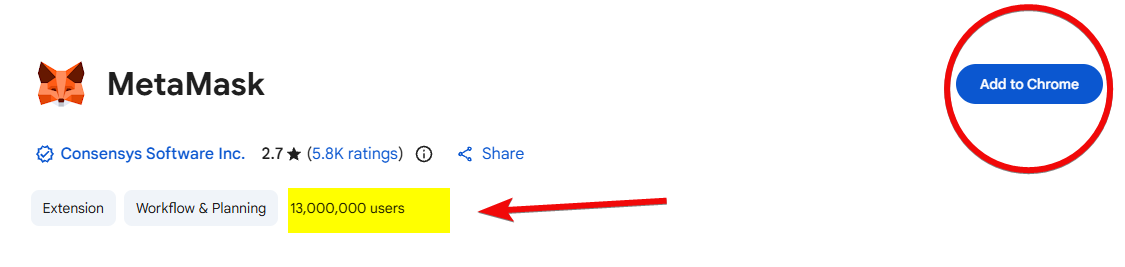
For security, only download MetaMask from the official website metamask.io. The official site will automatically detect your browser and redirect you to the installation page. This ensures you install the genuine extension with 13 million users, not a phishing one.
After installation, you'll land on the start page where you can either import an existing wallet or create a new one.
How to create a new wallet?
To create a wallet, click Create a new wallet, select the Use Secret Recovery Phrase option, and create a strong password.

For maximum security, we chose the Use Secret Recovery Phrase option because it gives you a seed phrase. Options like Continue with Apple create a wallet without a seed phrase, and the data is stored in the company's cloud. But the account could be hacked, so the seed phrase option guarantees the wallet remains under your full control.
Confirm that you understand: MetaMask support cannot recover this password for you. The wallet can only be recovered from the seed phrase backup.
How to back up?
After creating the password, the wallet will show you your recovery words.
Under no circumstances select Remind me later, as this is your secret set of 12 words that will help you recover your wallet in MetaMask or another application! This is extremely important for security.

Write the phrase on a piece of paper and do not store it digitally to avoid hacking. We showed the phrase for example purposes only as part of the guide. Losing the recovery phrase means irretrievable loss of access to your wallet and crypto assets.
After clicking Continue, you will need to indicate the positions of the words to confirm you have written them down. After correctly selecting the words and clicking Continue, the system will confirm success and remind you never to share this phrase with anyone.
Next, decline the collection of analytical data if you do not wish to share it, and at this point, the installation of the MetaMask wallet is almost complete.

To quickly open the wallet, MetaMask will suggest pinning it to Chrome's top bar.

Now you can start using your new wallet!
How to use it?
When you open MetaMask, news and available features will be displayed: buying/selling cryptocurrency (after identity verification), token swaps, and network selection (Ethereum, Solana, BSC, Arbitrum, etc., including the ability to add new ones).

At the top, there are accounts, and you can create an unlimited number of them. For example, one for long-term storage, another for DeFi activities, etc. They are like different bank accounts, but all accounts use the same seed phrase for recovery.
Now let's see how to receive and send crypto.
How to create addresses?
Different blockchains have different addresses. To get an address, select a coin, for example, Ethereum, and click Receive.

If the coin operates on the Ethereum network, its address will be the same as for ETH. For example, USDT on the Ethereum network has the same address. However, if it's a coin on the Tron network, the address will be from the Tron network. It's important to remember this, otherwise the coins won't arrive!
How to deposit?
You can deposit by transferring from an exchange, a crypto exchanger, or another wallet.
- From a phone - you can use the QR code to automatically fill in the address.
- From a PC - copy your wallet address, paste it into your other wallet (e.g., Phantom), select the amount (e.g., 0.1 ETH), confirm the transaction considering the fee, and send it.
Another method is buying directly in the wallet. To do this, click Connect wallet and confirm.

MetaMask will display providers for purchasing via bank cards. Different providers operate in different regions, or may not operate at all.

Buying via bank cards is not profitable due to the high fees of the providers and the wallet itself. MetaMask charges a fee of 1% for each transaction, which is calculated as a percentage of the fiat amount you request.
How to withdraw?
To withdraw crypto, in the extension window click Send, enter the recipient's address, select the asset, specify the amount, and click Next.

Then choose the gas fee: the lower the fee, the slower the transaction; the higher the fee, the faster.

If you agree with the fee, click Confirm.
Fees can fluctuate depending on network activity and market demand, so if the fee is too high, cancel the transaction and try again later.
What are the fees?
Fees are divided into 2 types - the wallet's service fees and network fees (gas), which go to the blockchain.
Swap Fees
For each swap, MetaMask charges 0.85% – 0.875%. This swap fee is quite high compared to regular exchanges. The fee has a cumulative effect.
For example, if you swap $100 a hundred times, over $50 will go towards these fees alone. This is how MetaMask earns around $60 million a year, and their total revenue has exceeded $300 million.
Blockchain Fees (Gas)
Blockchain fees (gas) are the transaction fees that go to the network validators, not MetaMask. To pay them, you need the native token: ETH (Ethereum), BNB (BNB Chain), SOL (Solana) - otherwise, you cannot send stablecoins (USDT, USDC).

When swapping assets, consider slippage (the percentage of price change). It can indirectly affect the fee. It is usually set manually in the range of 0.5% - 1%.
What other fee nuances are there?
- MetaMask Gas Station (works only for swaps) - allows for gasless transactions or paying gas not only in ETH but with other tokens. For example, when swapping USDC for USDT, the fee can be deducted directly from your USDC.
- MetaMask Card - when paying with the card, the fee on the Linea network is fixed at about $0.002 per operation.
How to pay lower fees?
- A direct way to save is not to use the built-in
Swapbutton. Instead, connect MetaMask directly to a DEX (e.g., Uniswap). This helps avoid the 0.875% service fee. - Also, when sending transactions, you can select the
Lowoption or set the fee manually. This reduces the second type of fee (blockchain).

Previously, L2 networks like Arbitrum, Optimism were also used, but after the Fusaka fork, the ETH network itself started charging $0.01.
How to perform a swap?
To make a swap, click Swap and select the directions. Swaps are available in all popular EVM networks: Ethereum, BNB Chain, Polygon, Arbitrum, Optimism, Base, Linea. And also on Solana.
MetaMask is not an exchange, but a smart aggregator. When you request a quote, it scans dozens of platforms (Uniswap, AirSwap, etc.) to find the best rate and minimal slippage.

In the swap settings, you can set slippage - the difference between the expected and actual price. Set it to 0.5–1%.
Is swapping safe?
The Smart Transactions feature simulates the trade before confirmation. This protects against MEV bots and errors.
However, always check the token's smart contract address before swapping, especially if the coin is little-known. To do this, go to a block explorer and look up the contract address.
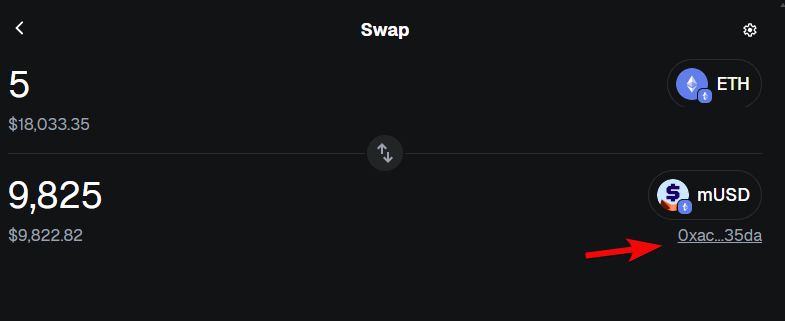
This helps avoid buying fraudulent assets that cannot be sold back.
How to manage your portfolio?
To access the more complete version of MetaMask, go to portfolio.metamask.io, select Connect MetaMask, then choose the wallet you want to connect, and click Next.

Now you'll see the full menu and functions on the left. In the top right corner, you can view the current gas price in real-time - a very convenient feature.

What does this portfolio give you?
The dashboard displays account balances, holdings with market statistics for each token, transaction history (including pending ones), as well as connected dApps and NFTs.
The Discover tab provides access to current market data, marketplaces, games, NFTs, and networks. Additionally, in the left sidebar, you have functions for buying, selling, swapping, bridging, and staking.

The bridge allows you to move assets between different blockchains (e.g., from Ethereum to Linea or Base) directly through the portfolio.
The portfolio is an important part of participating in the rewards program (MetaMask Rewards). This is where your swap and bridge volume is tracked to accrue points, which could influence a future airdrop. The seasons for distributing points and tokens last approximately 3 months.
But besides this, the portfolio also gives access to staking.
How to stake?
In staking, you lock up tokens (mainly Ethereum) and receive rewards for doing so.
You have 3 options:
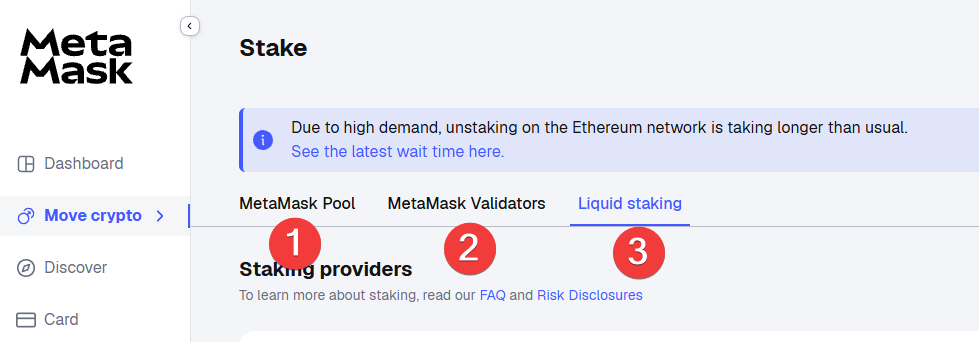
- MetaMask Pool. No high entry threshold. Yield - around 2.1% APR.
- MetaMask Validators. Here you run your own validator node through MetaMask infrastructure. Minimum threshold - 32 ETH.
- Liquid Staking. Integration with Lido or Rocket Pool. You stake ETH and receive a liquid token (e.g., stETH) that can be used in other DeFi protocols.

MetaMask takes a small fee (spread) from your rewards. Therefore, the yield in MetaMask pools is slightly lower than directly from providers. The MetaMask Pool offers around 2.1% APR. Lido offers around 2.6%. Rates change dynamically, these are just examples.
And although staking with Lido is historically more profitable, MetaMask's own pool will likely yield more points for airdrops and a larger token allocation.
How to work with the dApp browser?
The dApp browser is built into the portfolio and the mobile app. Here you can find applications for earning, lending, bridging, etc.
Applications can be filtered by categories and networks, including ETH, Monad, SEI, Linea, and Solana.

How to connect to DeFi?
- Click
Connect walleton the DeFi protocol's website - Select MetaMask
- And confirm in the wallet.
As an example, let's connect to AAVE:

All DeFi protocols have the same wallet connection principle. In the web versions of protocols, it's usually a button in the top right corner.
How to revoke permissions?
In the wallet menu, there is an All permissions tab where you can view and revoke connections.

You can also revoke permissions for active smart contracts through revoke.cash and DeBank.
Is it safe?
On one hand, the wallet has the integrated Wallet Guard security engine, which analyzes smart contracts. It also blocks drainer sites and translates transaction details into plain language before confirmation.
On the other hand, nothing is new under the sun, and dApps carry all the same risks as crypto: price manipulation, code vulnerabilities, liquidity provider losses during volatility, oracle bias.
How to add tokens and networks?
To add a token, click the three-dot menu on the main screen. Then Import Tokens and select the token in the search, e.g., USDT. Then click Import and you'll see it added.

You can also add custom tokens. To do this, select Import Tokens → Custom Token. You'll need to enter the token's contract address, after which it will be added.

Contract addresses can be viewed on etherscan.

The contract address is located on the right here.
To add a network, click the hamburger menu, and view the list of pre-installed networks. If you need to add a new one, click Add a custom network. Then you need to enter the RPC address, Chain ID, name, and symbol.

Here you can find EVM network data. And here are RPC addresses.
What advanced settings are there?
Advanced settings are hidden in the hamburger menu.
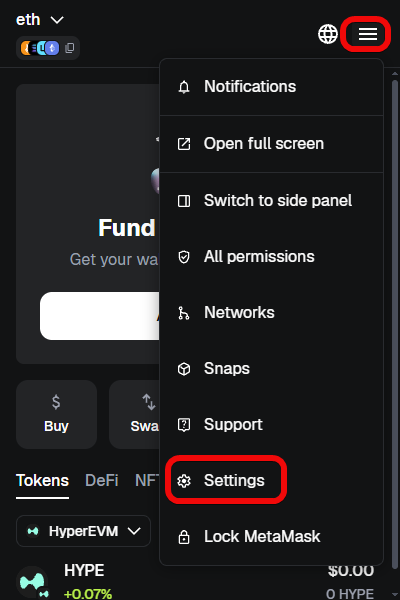
Here you can change the theme between light and dark, select languages and the currency for balance calculations.
Here you can also configure options such as:

Smart Transactions- simulates the transaction before confirmation to prevent errors, clarify gas price, and protect you from MEV bots.Smart account- this is a mode where your wallet gets superpowers: the ability to pay gas with any tokens, batch multiple operations into one, and in the future, use subscriptions and social recovery. Your address and funds remain the same, it's just an overlay in the form of a helper contract.
The security settings contain a number of important options. In this section, you configure protection and data collection parameters.
Basic functionality – essentially sends your statistics to MetaMask servers (IP is transmitted; can be disabled).

Security – here you can reveal your seed phrase, change your password, and enable security alerts.
Below are useful settings:
- phishing protection;
Don't show interstitial screen when opening deep links- On - links like https://link.metamask.io/... will open MetaMask directly, without a warning screen. Convenient, but careful: such links could be spoofed by scammers. The screen exists to prevent you from accidentally opening a page where your balance, tokens, or settings are visible.Decode smart contracts– transactions are checked via the byte.directory service, which displays the code in human-readable language.
Further down are technical network and gateway settings:
- displaying token balances and prices (CoinGecko, CryptoCompare);
- balance change estimation before confirmation;
- network provider selection (Infura by default or custom RPC);
- network parameter verification (chainid.network);
- IPFS gateway (configurable, transmits IP);
- showing ENS domains in the address bar;
- automatic token detection;
- batch account balance requests;
- displaying NFT media (transmits IP to OpenSea, etc.);
- automatic NFT detection.
Now let's see how to add extensions to the wallet to get even more functionality.
How to use Snaps extensions?
MetaMask Snaps is a system of plugins from third-party developers that extends the wallet's functionality without compromising security.
Why would you need Snaps?
Snaps allow MetaMask to work with blockchains that are not natively compatible with Ethereum - Cosmos, Starknet, Tezos, XRP, Sui, Near, and over 50 other networks. Snaps also add phishing protection, transaction auditing, push notifications for on-chain events, and even tools for tax calculation.

How secure are Snaps?
Snaps run in an isolated sandbox - the plugins have no access to your private keys or secret recovery phrase. Each Snap undergoes strict review, audit, and is published with open source code before being listed in the official directory. You don't need to install 10 different browser extensions - everything lives inside MetaMask in a controlled environment.
Where to find them?
You can find and install plugins through the official MetaMask Snaps Directory.

Snaps are installed in a couple of clicks – simply click Add to MetaMask and confirm in the wallet.

In this example, we added the Cosmos blockchain.
How to recover a wallet?
You can recover a wallet using the seed phrase. Let's try recovering MetaMask on the mobile version.
To recover, download and install the app from the Apple App Store or Google Play, open it, and select I have an existing wallet, then Import using Secret Recovery Phrase.
Review and accept the terms of use, then enter your secret recovery phrase in the correct order, enter and confirm your password.

Now you can use your wallet both as a browser extension and on your phone. The wallet has Turn on backup and sync options that allow you to synchronize all your custom settings (networks, tokens, interface). They will be the same on all devices.

When reinstalling MetaMask, you just need to log into your account, and the settings will be loaded automatically.
What are the disadvantages of this wallet?
In terms of disadvantages, we can highlight low performance. The issue is that due to the abundance of features, the wallet becomes a bit of a "Narnia" (cluttered/complex).
Cons:
- Many features cause technical lag and a confusing interface for beginners.
- It's a hot wallet, always connected to the internet, meaning there's a risk of it being hacked.
- The wallet's security system and built-in scanners do not always recognize fraudulent tokens (honeypots) in time, allowing you to buy coins that cannot be sold back.
Finally, the point system for future airdrops is inefficient and gets diluted due to over 100 million MetaMask addresses. Expected airdrops might turn out to be mere pennies.
Comparison of MetaMask with Trust Wallet
The choice between MetaMask and Trust Wallet depends on the wallet properties you need. Trust Wallet supports over 100 blockchains and has no fees for swaps (except network fees). Trust is more suitable for beginners due to its integration with centralized exchanges. MetaMask, on the other hand, is more focused on ETH networks and charges 0.875% for swaps. However, MetaMask offers advanced gas settings and is more convenient for working with dApps.
| Property | Trust Wallet | MetaMask |
| Wallet Type | Hot | Hot |
| Blockchain Support | 70+ networks | EVM networks + Ethereum, Bitcoin, Solana, Tron, BNB |
| Ease of Use | Suitable for beginners | May cause difficulties |
| Staking Support | Yes | Yes |
| Open Source | Partially | Yes |
| dApp Integration | Yes | Yes |
| Mobile App | Yes | Yes |
As these are wallets with constant internet access (hot), both have had security incidents. For example, Trust Wallet experienced 2 major security incidents: the first attack with damages of $4 million. The second was a hack of the browser extension version 2.68 with losses of $6–7 million.
MetaMask has also had an incident, but it affected very old versions of the wallet. The vast majority of incidents involving loss of funds are not due to a hack of the wallet itself, but to phishing attacks, fake extensions, and theft of seed phrases through clone sites.
Summary: is it worth using?
MetaMask has already outgrown the format of a simple wallet, turning into an "operating system for web3." But the multitude of features creates a confusing interface.
On the other hand, thanks to the integration of the Wallet Guard engine and "smart transactions," MetaMask users hardly suffer from MEV bots.
Ultimately, without using hardware wallets (Ledger, Trezor), MetaMask still remains vulnerable to viruses and phishing on the user's device side. And the high fees for swaps and bridges make using one of the most popular wallets simply unprofitable.
In our rating, we reviewed hundreds of wallets and their security. MetaMask's main and closest competitor is Rabby Wallet from the creators of DeBank. Whether to use this wallet or choose one from our comparison rating - the final answer is always up to you.
Have a great day! Your editor - Maxim Anisimov for bytwork.com.
Technical Support:
Disclaimer: all information provided in this article should not be construed as financial advice. The article was created for educational purposes. Never invest more than you can afford to lose, and seek advice only from your personal financial advisor.


