WEEX crypto exchange: Security, trading, and token overview

The interface is slow and laggy, there are a lot of intrusive promotions, and the bonus terms are unclear.
Demo trading, 1000 BTC security fund, and verification of reserves and licenses.
You will learn everything about the WEEX exchange: licenses, security, types of trading and orders, as well as their staking tools, copy trading, and native token. We will, as always, examine the disadvantages and risks under a microscope.
Overview
The WEEX crypto exchange was launched in 2018. It is based in Singapore and has over 6 million users. The platform specializes in futures trading, offering more than 1700 different pairs with the possibility of using leverage up to 400x.
| Year Founded | 2018 |
| Headquarters | Singapore |
| Number of Futures Pairs | 1000 |
| Maximum Leverage | 400x |
| Operation without KYC | ✅ Yes |
| 24h Withdrawal Limit without KYC | $10,000 |
| Demo Trading Mode | ✅ Yes |
It offers tools such as:
- Spot trading, copy trading, demo account, its own token WXT, the WE-Launch platform for airdrops.
- Advanced users can explore sections with AI trading and trading bots, and the Trade-to-Earn program.
- Finally, there is a rewards center with bonuses, trading tournaments and hackathons, a mobile app, and P2P trading.
WEEX positions itself as an exchange with no mandatory verification. This allows you to trade, deposit, and withdraw funds without disclosing personal data. This protects against leaks of personal information.
Let's examine how all these exchange features work and what risks they entail. But first, let's look at the exchange's owners.
Who Manages the Exchange?
In the role of Chief Operating Officer, Andrew Weiner is mentioned, playing a key role in the company's operations and representing it at official events. Previously, he served as Vice President of the MEXC Global exchange and grew its user base from 6 to 12 million people through partnerships with developers and opinion leaders. Since March 2024, becoming Vice President of WEEX, he focuses on attracting up to $19 trillion from traditional finance (TradFi) by creating a unified platform for derivatives, copy trading, and DeFi.

However, his public biography is not available.
The co-founder of the exchange, Ethan Tong, is responsible for the security architecture. Let's look at the most important aspect when choosing a platform – security.
How Secure Is It?
In terms of security, it's always important to look at the licenses and registration of crypto exchanges.
The exchange is officially registered as WEEX International Exchange LTD. It is registered with financial supervisory authorities as an MSB in the USA (FinCEN) and Canada (FINTRAC), and also has an offshore registration SVG FSA (№2824) in St. Vincent and the Grenadines. This provides legal grounds for the exchange to engage in crypto activities.

However, there are also issues.
Problems with Regulators?
There were issues earlier, in 2024-2025. WEEX received a cease and desist order in the state of Georgia, and then in Arkansas for unlicensed money transmission.
As a result, the exchange has 5 declared licenses, and it operates everywhere except the states of Georgia and Arkansas. However, the Terms of Use have a footnote stating that the exchange may refuse to provide services to some regions.
Now let's look at the security of the exchange itself.
Security:
- Protection Fund of 1000 BTC, stored in cold wallets. These funds are intended for compensation in case of hacking attacks or other force majeure events, and the reserves themselves can be verified on the blockchain.
- Two-factor authentication is used to protect accounts, including Google Authenticator and SMS/email confirmation.
- The exchange's native token, WXT, has undergone a security audit by the specialized company Bosen.
- The exchange provides proof of reserves, which guarantees that user funds are present on the exchange's balances.
- Verification of reserves is available for data checking on GitHub.
You can check trading volumes on CoinMarketCap and CoinGecko.
The bottom line on security is this: since 2018, the exchange has not been involved in any successful hacks. There are audits for the WXT token, standard 2FA/SMS, and a 1000 BTC protection fund.
Finally, let's move on to the practical use of the exchange.
How to register and secure your account?
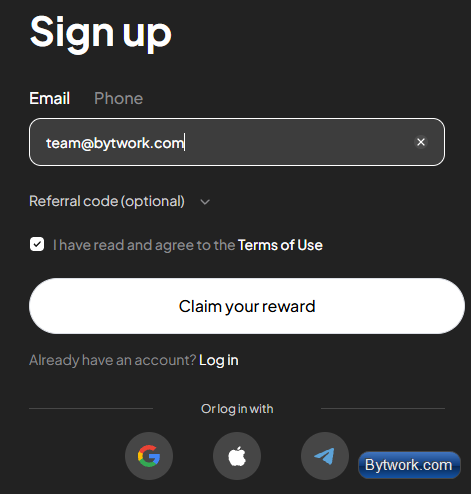
To register, you need to enter your email, click the Claim your reward button, create a password, and then enter the activation code sent to your email.
It's safest to use a separate email, for example on Gmail. The email should also be protected with 2FA or a YubiKey.
The password should also be unique to the exchange to prevent it from being exposed in leaks from other services.
After registration, the first thing you need to do is go to the Settings tab and set up Google Authenticator.
Click "Configure" on the right; a QR code and a long alphanumeric key will appear below. Write down this long key and store it in a safe place (not online). If your phone breaks, you will only be able to recover access using this key.

Next, download the Google Authenticator app on your phone and scan the QR code. The app will generate a 6-digit code that refreshes every 30 seconds.
From now on, for any important actions on WEEX, such as withdrawing funds, the platform will ask for your Google Authenticator code to verify that it's really you.
Also, enable withdrawal codes and Anti-Phishing for emails.
How to Fund the Exchange?
Now let's show you how to fund your account at the most favorable rate. Click the Deposit button and choose the cryptocurrency. It's most advantageous to deposit using USDT tokens via the TRC-20 network.

After that, you will see your personal deposit address, which you can copy. For safety, it is recommended to first send a small test transaction to ensure all settings are correct, and then transfer the remaining amount.
The exchange does not support fiat currency without verification. But there are 2 ways to deposit.
Trading in P2P Format
You can also fund your account through the Quick Buy option directly from a card or through P2P trading, where you buy cryptocurrency directly from other users.
However, to use direct purchase from other users, you need to complete identity verification.

It's important to remember that despite all precautions, P2P trading always carries the risk of encountering an unscrupulous counterparty.

Transfer from a Wallet or Another Exchange
If you have a wallet like MetaMask or Electrum, you can fund the exchange by transferring from these wallets.
After the deposit is processed, check the asset overview to ensure the funds have been credited.

Now you can use the exchange, but it's best to start trading with a Demo account.
Why is it Safer to Start with Demo Trading?
This increases the safety of your first trades, because you can practice here without the risk of losing real money.
Similarly, if you are an experienced trader with a new strategy and want to test its effectiveness without the risk of losing real money, practicing on a demo account is a good solution.
The demo account provides 20,000 virtual USDT for practice, with the ability to top up another 20,000 USDT within 72 hours and leverage up to 200x.

To top up the demo account, you need to click the plus sign every 72 hours and get new coins for backtesting your strategies.
How to Trade on the Spot Market?
Remember, spot trading is the simplest type of trading without leverage.
In the center is a panel with a chart, and you can easily switch between different timeframes. This spot chart is integrated with TradingView.
Next to it is a section for searching various coins, so you can select the asset you're interested in, such as ETH. Above the chart, the current price, price change of the selected coin, trading volume over the last 24 hours, as well as the max. and min. price are displayed.

The principle of making money here is standard: buy an asset cheap and sell it dear, with the difference in rates being your net profit. Accordingly, the windows for buying/selling are located below the chart.
Spot trading is suitable for long-term investments because, unlike futures, there is no risk of position liquidation during sharp market fluctuations - you remain the owner of the coin regardless of its price.
There are 2 types of orders here:
- Limit – you can choose the exact price for the asset.
- Market – the trade is executed immediately at the current price.

For example, we bought 0.004 BTC with a limit order, and this amount is now displayed in the available balance section. You can sell it immediately if you wish.
Now let's look at a more complex type of trading and study futures trading in more detail.
How to Trade Futures?
If you deposited a cryptocurrency other than USDT, you will first need to convert it to USDT for futures trading. If the crypto is not in USDT, convert it on the Spot market. To do this, select the pair (e.g., BTC/USDT) and sell it with a market order.
Next, transfer the USDT to your futures account.

Next, select Futures -> USDM Futures. On the trading page, in the upper left corner, you can select the desired trading pair, e.g., BTC or ETH.

The interface includes a price chart based on TradingView with various tools and timeframes, the order book on the right, and a section at the bottom for viewing open positions, orders, and history.

The right panel displays available capital and all control elements for executing trades: setting leverage, order type, position size, take-profit and stop-loss for long and short positions.
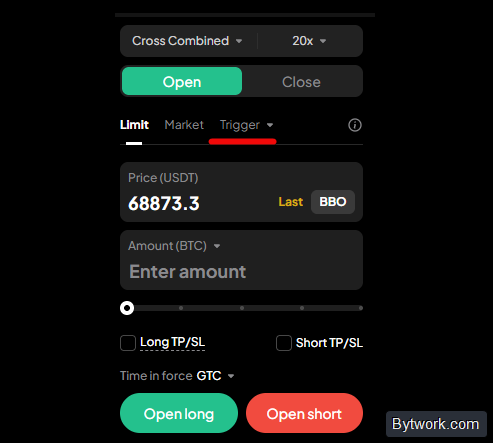
Here we also see a trigger order. It is activated and placed in the system only when the market price reaches a certain activation price (trigger).
You can choose which price to use for trigger activation - the last trade price (Last Price) or the mark price (Mark Price).
Here we described all the advantages and risks of trigger orders on crypto exchanges.
How to Open Your First Position?
Let's look at opening a long position as an example. First, make sure that the settings have Isolated and Combined modes selected - a useful function that allows you to manage multiple positions in the same pair both separately and together.

When they are selected together (Isolated Combined), this determines how the exchange manages your risks and multiple trades on the same asset.
Next, set the leverage, which is available up to 400x, and this is a very dangerous and high leverage.
For the example, let's choose 5x leverage.
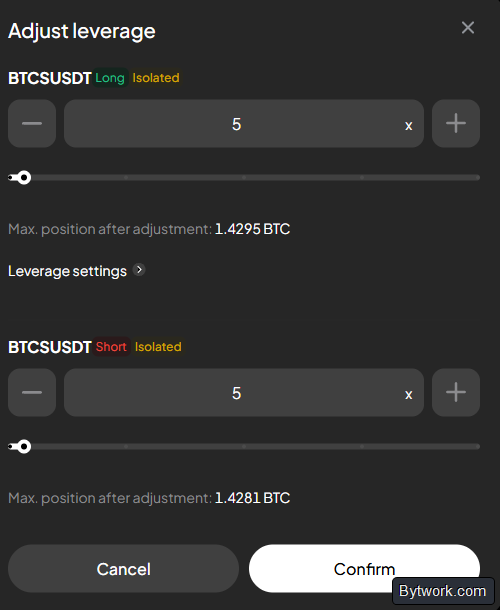
When opening a trade, you can choose a limit order (execution at a specified price) or a market order (immediate execution at the current price).
It's usually better to use a market order. To determine the position size, it's convenient to place the order by quantity in USDT. For example, entering 500 $ means you are using 100 $ of your own capital as collateral, which with 5x leverage gives a 500 $ position. The interface will show the corresponding amount of Bitcoin and the liquidation price.

You can also set take-profit and stop-loss.
How to Set Take-Profit and Stop-Loss?
Take-profit and stop-loss can be set by a specific price, percentage return, or profit/loss in USDT.
For example, you can click on the ROI (%) area and configure a trigger TP/SL:

You can set a take-profit to gain 50 $ profit and a stop-loss to limit losses to 18 $ - the system will automatically calculate the corresponding prices.

After setting up, click Open long to enter the trade.
How to manage open positions?
At the bottom of the screen, a list shows all your open positions.
For example, for an open Bitcoin position, you'll see whether it's long or short, the leverage used, position size, current profit or loss, allocated margin, entry price, current market price, and liquidation price.

In this panel, you can view unrealized profit or loss separately from already realized profit or fees. You can also change the take-profit, stop-loss, or completely close the trade here.
Liquidation price is the level at which the position will be automatically closed, and you will lose the margin (the 100 $ collateral) if a stop-loss is not set. Thanks to a pre-set stop-loss, the trade will close upon reaching the specified loss level, preventing liquidation. Liquidation maps can help you better understand the market.

Take-profit and stop-loss can be easily edited by dragging lines on the chart or by going to the Open orders section, clicking on the trigger, and precisely changing the values.

You can also close a position partially or fully. To instantly close the entire position, use the Cancel button.
And if you want to set new values, return to the Positions section and click on TP or SL.

What Are the Fees?
The exchange sets different rates for different types of orders. A maker fee is charged when using a limit order, and a taker fee is charged when using a market order. For simple spot trades and asset exchanges, the fee is 0.1%.

WEEX also has a multi-level VIP program, allowing you to further reduce fees for futures trading. You can move to different VIP levels depending on your 30-day futures trading volume, the number of WXT tokens in your account, or the average balance over the last 5 days. All fees are listed in the fees tab at the top of the page.
How to Reduce Fees?
The simplest way to reduce fees is to place limit orders instead of market orders. The fees for them are significantly lower because these orders add liquidity to the order book. To guarantee paying as a maker, enable the Post-only function.

For Post Only on futures, the maker fee applies - 0.02% base, with possible discounts down to 0.006% for VIP or WXT token holders. This function automatically rejects the order if it would be executed as a taker order.
The fee is also reduced depending on VIP levels. However, this is only suitable for those who trade really high volumes.
For active traders, the Trade-to-Earn program is available. It returns up to 30% of paid fees in WXT tokens.
About Other Fees
Withdrawal fees depend on the selected network. For example, withdrawing via Optimism might cost only 10 cents. Always check the network before the transaction - TRC20, ERC20, and others.
In copy trading, you only pay for successful trades. When copying elite traders, you give them a share of the net profit (10%), but only if the trade closed in profit.
What Are the Copy Trading Capabilities?
Copy trading allows you to automatically copy the trades of experienced (elite) traders. As soon as the trader you selected opens or closes a position, the bot repeats this action on your account.
If your funds are in the spot wallet, transfer them to the futures wallet to use for copy trading.
On the copy trading page, there is a Become a Trader option for those who want to become a lead trader themselves. If you apply and it's approved, others will be able to copy your trades, and you will receive 10% of their profits.

Below are the participants whose trades you can copy, and it's very important to choose reliable traders to copy.
To avoid losing funds, it's not enough to just look at the pretty profitability number on the main screen. Use our guide on how to choose traders to copy.
To minimize risks:
- Don't fall for 300% profit in a week. Look at the all-time history.
- The
Copierstab might show that a successful trader is causing losses for their followers, even if their personal account is growing. - The number of followers and trades might be inflated.

For a complete picture, look at other metrics as well:
Total PnL- how much the trader themselves have earned.Win Rate- statistics of successful trades over the last 3 weeks. But be careful: a 100% win rate could mean just one successful trade in a week!Profit Share Ratio- the portion of the net profit (usually 10–20%) that you give to the trader, but only if the trade was successful.
When setting up copying, you choose the mode (Uniform/Separated), trading pairs, leverage (fixed or based on the trader). Next, you allocate capital as a fixed amount from 10 USDT or as a proportion to the master's trade, and set risk limits like a 20% loss stop-loss.
There are 3 leverage modes for copying:
Trader- automatically copies the leverage used by the master trader in their trade.Customized- user sets a fixed leverage independently, separately for long and short positions.Position- uses the leverage settings configured in your own futures terminal at the time of the trade.
What Are the Staking Conditions?
The staking functions and passive income generation are implemented through the Earn section and mechanisms involving holding the WXT token.

The exchange offers flexible staking, where income is accrued automatically on the asset balance without locking them, but stops when the tokens are sold. And the Auto Earn function allows you to earn interest on free trading capital.
It's important to understand that staking carries risks of losing funds due to token volatility (a price drop can negate profits), strict program conditions (holding from 7 days), and potential liquidity issues with new tokens. Additionally, there is no guarantee of profit and there are general vulnerabilities of a centralized platform, despite the 1000 BTC insurance fund.
Holders of the exchange's native token (WXT) are eligible for special conditions, similar to staking.
Why is the WXT Token Needed?
WXT (WEEX Token) is the native utility token of the WEEX crypto exchange, launched in 2024. Holders of the WEXT token gain access to airdrops of new projects on the WE-Launch platform, as well as maximum discounts on trading fees (especially on futures).
The total supply is 10 billion tokens, with over 40% already burned. WEEX buys back and burns its WXT quarterly using fees, supporting deflation and asset growth.
What's important to know about WXT?
- The smart contract has passed a Bosen audit.
- WXT is traded on WEEX, MEXC, LBank, and Uniswap.
- Since its launch, the token has grown by 275% (from $0.009 to above $0.03).
- Analysts compare its potential to BNB, BGB, and MX.
On the other hand, the future of the WXT token depends on the viability of the exchange itself. And in a crypto winter, this could become questionable.
What Does Verification Provide?
Identity verification is not mandatory, but upon completion, you get increased withdrawal limits.
- Without verification, the daily withdrawal limit is 10,000 USDT.
- With verification – the limit increases significantly to $10,000,000.
Verification also opens access to the p2p trading section.
Verification takes about 1 minute (in some cases up to 60 seconds). To do this, you need to upload documents and undergo a biometric facial check using a video camera (performing simple head movements as instructed). However, data verification by the system can take up to 72 hours depending on the type of participation in promotions.
After trading to your heart's content, let's check the withdrawal process.
How to Withdraw?
Withdrawing cryptocurrency from the exchange is only possible from the spot wallet, which requires setting a 6-digit withdrawal password in the security section.
For a safe withdrawal, you must strictly select the networks of the sending and receiving wallets. For example, Optimism.

We withdrew 50.031 USDC. 49.9 coins arrived.
To minimize risks, it's also recommended to first perform a test withdrawal of a minimal amount to verify that they arrive.
What Are the Disadvantages and Risks?
Leverage up to 400x (and up to 200x in demo mode) carries critical risk. Here, even a minor price fluctuation (for example, a BTC drop of just $100) can lead to the immediate liquidation of your entire position.
Another drawback is the extremely limited selection in p2p trading.
Also, users complain about account blocks, withdrawal issues, weak support, and hidden fees. Yes, such reviews can be found for all crypto exchanges without exception, but caution is still advised.
Finally, let's note technical lags. The main page is overloaded with a heavy autoplay video.

Even when logged in, the exchange spams various pop-ups, listings, and enticing bonuses. This is annoying and distracting from trading.
Conclusion: never trade with funds you cannot afford to lose, and always use stop-losses to limit losses.
The Bottom Line?
The Singapore-based crypto exchange WEEX, launched in 2018 with investments of 100 million $, provides 6 million users access to 1700+ trading pairs without mandatory verification. It offers leverage up to 400x and protects assets with an insurance fund of 1000 BTC. There are many tools such as copy trading, staking, and airdrops.
On the other hand, the exchange's interface is extremely slowed down by intrusive advertising. Interface lags occur during tradke CoinMarketCap and CoinGecko, and also pay attention to the presence of licenses. All these points are extremely important.
We have been trading cryptocurrencies since 2018, and we have tested hundreds of crypto exchanges, and the conditions of bonus programs are vague.
Its important to understand that the risk of default on Weex is higher than on larger exchanges. As an alternative that doesnt require verification, theres Coinex, which has been operating since 2017.
When choosing a crypto exchange, be sure to read reviews, study the reserves, and verify data on sites lis. Whether to trade on WEEX or choose another platform from the crypto exchange rating is, as always, up to you. Happy trading! Your editor - Maxim Anisimov for bytwork.com.
Please note: we are not licensed financial advisors, and this material is intended for educational purposes only and should not be considered financial advice.


