TronLink wallet: A complete guide to setup, security, and staking TRX

The Bandwidth and Energy systems for transactions are confusing and seem difficult for beginners. Furthermore, the wallet supports only a few networks.
A simple wallet for TRON and USDT with 2 free transactions per day.
You will learn about the official Tron wallet – TronLink. We will examine its security, supported coins and networks, swaps, staking, and free transactions via the Energy and Bandwidth system.
Overview
TronLink is the leading decentralized wallet for interacting with the TRON blockchain. You store your keys yourself, meaning it is a non-custodial wallet. It works on both PCs and mobile devices.
It supports the following networks:
TRC-10- native tokens of the TRON blockchain (e.g., USDD).TRC-20- smart contract-based tokens (similar to ERC-20), such as USDT, ETH, BSC.TRC-721- the standard for non-fungible tokens (NFTs).
Simply put, the wallet supports the TRX coin itself, TRC-10/20 tokens (like USDT) and TRC-721 NFTs, plus staking, dApps, and cross-chain bridges. We will break all of this down below.
The TronLink extension also supports EVM networks, including Ethereum, BNB Smart Chain, and BTTC. It offers seamless access to dApp applications and convenient operations on the blockchain. All of this makes it suitable for various Web3 wallet connection use cases.
Its multi-chain HD wallet structure allows you to manage assets across all these networks with a single seed phrase, so you won't need multiple seed phrases.

The interface is standard for browser extension wallets. It is a decentralized wallet, similar to MetaMask, Phantom, or Keplr, and it fully supports staking mechanisms.
It also offers Ledger/Trezor wallet import via Bluetooth and a multi-signature function.
However, let's start as always with the most important aspect of any wallet – security.
What are the security features and functions here?
TronLink is the official wallet of the Tron network. It was developed and is fully supported by the Tron team, which has made it the primary tool for operating within this ecosystem. Thanks to this status, the wallet is chosen by over 90% of the network's users. But how secure is the wallet?
Security:
Seed Phrase- this is your key to the funds. The phrase consists of 12 or 24 English words, and you store the secret phrase yourself.Function to hide risky tokens– allows hiding fraudulent transactions.Address Book– for quickly adding addresses to a whitelist.Integration with Ledger and Trezor– provides physical key isolation and the highest level of protection.Application Password- a local password created only for logging in on the device.Auto Logout- set an automatic lock timer to protect the wallet from others if you step away from the device.
Also, the Multi-signature function adds a layer of protection for important operations. With it, no one can withdraw funds without several signatures.
However, the risk of a wallet constantly connected to the internet should not be forgotten. This is a so-called hot wallet, where the risk of your device being hacked is higher than with a cold wallet. Therefore, it is more suitable for small operations, like cash in your pocket. Keep major assets in a cold wallet!
Economic Functions:
2 free transactions per dayvia wallet resources: bandwidth (Bandwidth) and energy (Energy).Staking– freezing coins to receive free transactions and passive income.In-wallet swaps– you can perform swaps via the built-in sun.io exchanger.Voting- needed to receive passive income and help select the nodes that manage the network.Dapps– connect to web3 protocols where you can earn, play games, or participate in lending.
It also has NFT collections, integration with the TronScan transaction explorer, and the ability to manually add desired coins. The Watch-only function allows adding and tracking addresses without entering a seed phrase.
Let's see how all this works in the wallet. To do this, let's download and set it up.
How to download and install?
Download TronLink only from the official sites tronlink.org and tron.network (the official TRON site, where it is first on the list of recommended wallets). This will protect against data and fund theft.
The wallet is available for Android/iOS and as a browser extension (the latter supports more networks). Let's choose Google Chrome. In the window that opens, click Add to Chrome.

After installation is complete, you need to open the extensions list and select TronLink in it.
How to create a new wallet?
In the window that opens, select the Create Wallet item, scroll through the user agreement to the very end, and agree to it by clicking the appropriate button.

On the next screen, we will be prompted to set a name for the wallet, as well as create and repeat a password. Please note that the password must contain uppercase and lowercase letters, numbers, and be at least 8 characters long. Next, click Create Wallet and Back up Wallet. You have created a wallet, but now it's important to preserve access to it!
How to back up?
Click Back up Wallet, after which we will be asked to enter the password we just created. On the next page, TronLink will prompt us to write down a 12-word seed phrase on paper - don't ignore this and do it.

This phrase is necessary to restore your wallet; save it in a secure place and do not show it to anyone. Never, under any circumstances, should you show this phrase to other people!
It is also important not to take screenshots of the seed phrase, as they can be intercepted by hackers through access to the device's gallery.
At the next stage, there is an additional check where you will need to select words corresponding to a highlighted number.

Once you pass it, the wallet will open in front of you, with TRX, USDD, and USDT coins immediately visible. If you need to add other coins, click the plus sign in the upper right corner of the balance field and find the one you need.
So, let's figure out how to use TronLink!
How to use it?
After creating the wallet, your address is displayed at the top. Copy it to send Tron network tokens to it, including TRX and USDT.
At the top, there is an address switcher between General and GasFree. General is your personal account in the wallet. And GasFree is a function that allows you to conduct transactions in dApps without paying gas fees from your account, shifting these costs to a sponsor (the project).
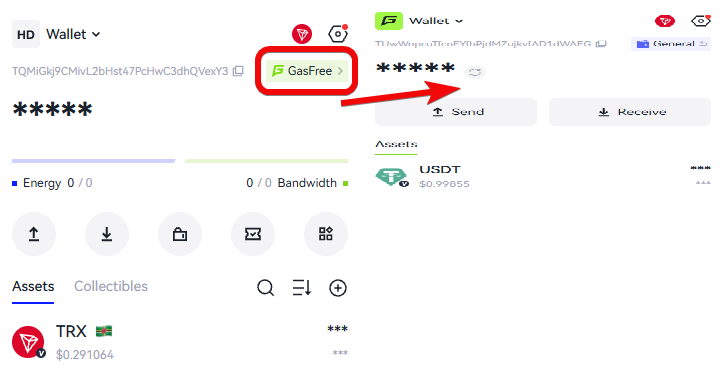
It is important to understand that this function does not work for regular transfers of tokens between user wallets – only for dApps.
How to create addresses?
Your personal address is on the main tab. And when you click the down arrow button Receive, you will get the address and a QR code.

It is important to understand that this is an address specifically for the TRON blockchain. This address only accepts TRC10/20/721 network coins. That is, TRX itself, USDT, USDD, and other tokens on the Tron network.
If you need other networks, for example ETH, then you need to switch the wallet by clicking on its name Wallet and select another network. Here you have Ethereum, BSC, and BITTC networks.

Addresses for the Tron and Ethereum networks are different. Therefore, always check them before depositing. Ethereum (ERC-20) and BSC (BEP-20) addresses are the same because BSC is compatible with the Ethereum Virtual Machine (EVM).
However, it is important to understand that ERC-20 tokens are only visible on the Ethereum network, and BEP-20 tokens are only visible on BSC, despite the same address.
At first, this may seem confusing, just remember: TRON and Ethereum network addresses differ, so always make sure you are using the correct address for depositing TRC-20, ERC-20, or BEP-20 tokens.
Also, an address on the TRON network requires activation. You need to fund the wallet with at least 0.1 TRX so that a record of it appears on the blockchain.
How to fund it?
You can fund the wallet in 2 ways:
- Transfer from a crypto exchange, for example Bybit, BingX.
- Use exchange bridges
To fund the wallet via an exchange, go to the withdrawal section, select TRX and the TRC20 network. Then use the standard exchange withdrawal procedure:

The second funding option is a bridge via the Rubic Exchange application. This aggregator allows moving assets from many different networks, including Ethereum and BNB Smart Chain, to Tron.
But you will need another wallet, like MetaMask.
To move coins from Ethereum/BNB Chain to Tron:
- Connect MetaMask to the aggregator (bridge).
- Swap BNB (on BNB Chain) for TRX
- Enter the address from TronLink (like
TX1...) in Rubic, select the low-fee option (for example, ChangeNOW) and confirm. The tokens will arrive in TronLink in a few minutes.

You can use different bridges, not necessarily Rubic.
What are the fees?
The TRON network has 2 resources for free transactions - energy (Energy) and bandwidth (Bandwidth). If you have them in your wallet, you don't need to burn TRX to pay fees.
Bandwidth and Energy System:
- Bandwidth (
bandwidth) – used for simple operations - transferring TRX, TRC-10 tokens, freezing, unfreezing, or voting. The wallet allocates 600 units for free per day, which is enough for 2 transactions. - Energy (
energy) - needed for smart contracts, especially USDT (TRC-20) transfers. There is no free limit. And although the network is dynamic, one USDT transfer requires 31,895–32,000 units. Without energy, the network will deduct over 13 TRX (about $1.66).

Energy is not provided for free - it must be purchased, rented, or obtained through staking. If there is no energy in the wallet, the network will automatically convert part of your TRX to pay fees, which is less profitable.
Why rent energy?
It allows you to significantly reduce transaction costs and avoid burning TRX coins for fees.
Where to rent energy for fees?
- TR Energy saves up to 56% on fees
- Tron Energy Market offers rentals from 1 hour. 32,000 units (minimum for a transfer) cost about 1.5 TRX - 10 times cheaper than the network fee.
- Feee.io provides short-term rentals from 1 hour. Volume for one transaction will cost less than 4 TRX.
- Tron Pulse also allows renting and selling resources.
How to rent energy?
The rental process is simple. Connect your wallet to the site via a browser or the DApp browser in TronLink - the Connect Wallet button.

Select the required amount of energy. Specify the rental period and confirm payment. Energy will immediately be credited to your address, and you will be able to transfer funds without TRX being deducted for gas.
However, the most profitable way to obtain energy is staking your own TRX. In this case, the resource is restored for free within 24 hours.
How to stake?
To obtain energy and bandwidth, you can stake TRX. Click Stake in the wallet, select Staking for Energy or bandwidth, and specify the amount of TRX to stake.

This will allow you to receive energy or bandwidth daily, but keep in mind that the funds will be locked for 14 days.
For example, freezing 1,350 TRX yielded 17,245 Energy.

Is it profitable?
It is a way to save on fees and earn from voting if you are active in the TRON ecosystem. If not, it's easier to hold TRX in a wallet without staking.
Regarding USDT/TRC20 transactions, it's important to remember that when sending coins to the address of another non-custodial wallet, 32k energy is required, but if the send is to an exchange or exchanger address, where everything works on smart contracts, then the transaction becomes more complex and requires 64k energy. In this case, you will need to stake about twice as much Tron (approximately 5100 TRX) to send coins without a fee.
The amount needed to generate the required volume of energy depends on the total amount of TRX frozen across the entire network (your share), and it is not fixed.
In addition to Energy, you also receive interest in TRX. The yield from delegating coins (staking) itself ranges from 3 to 5%.

Is it profitable?
It's better than just holding TRX idle in an account. But the main risk of crypto remains – price volatility.
To delegate coins, go to Stake in the wallet, click Vote, select a representative, enter the number of coins (you can delegate to several participants), and confirm.

Claim rewards via the Claim button.

If you forget to withdraw rewards, the coins will not work on a compound interest principle.
How to make a swap?
TronLink allows you to exchange cryptocurrencies via the built-in DEX (Sun Swap) and other services.
When swapping on Sun Swap:
- Fee: ~$1 - moderate.
- Slippage (possible price change percentage): -0.11% - minimal, good.

However, it's important to check the rate and compare it with exchange rates.
How to withdraw?
To withdraw coins, go to the Send menu, select the token to withdraw, the amount, and confirm.

Remember, depending on the asset, you will need Energy/bandwidth, which we discussed in the fees section.
DApp Browser
The built-in DApp browser in TronLink directly connects you to TRON DeFi services, allowing you to, for example, rent 32,000 units of energy on JustLend for cheap USDT transfers without burning TRX on fees.

The browser is located in the More menu. Here you can also revoke permissions and see recommended applications.

Here you get direct access to the RWA ecosystem, the JustLend lending platform, and the SunPump meme coin platform.
It's important to remember that you need to carefully watch what you sign in dApp applications.
What advanced settings are available?
The wallet is rich in settings. In the Security & Privacy menu, you can change the password, enable phishing detection, and reset wallet connections to Dapps, i.e., revoke connection permissions.

Furthermore, the Token List Sync option synchronizes your token list between phone, computer, and other devices via the cloud. And Reset Wallet will completely reset the wallet data to factory defaults, including the password and seed phrase. So make sure you have the phrase.
In addition, the settings hide features like:
Convenience:
Address Book- saving addresses for quick transfers (no need to enter manually each time).Networks- selecting a network (TRON, testnet, etc.) for interacting with different blockchains.Set Default Wallet- setting this wallet as the default in the browser.
Personalization:
Denominated Currency- displaying the balance in USD, EUR, etc. (convenient for value estimation).Language- changing the interface language.
About the wallet
About Us - information about the version, checking for updates, links to support.
How to restore a wallet?
To restore a wallet, during installation instead of creating a new one, select Import Wallet, accept the agreement, and paste your seed phrase.

We restored the wallet on mobile and it displays the same assets as the browser extension.
What are the disadvantages of this wallet?
This wallet has specific drawbacks and risks that are important to understand. The TronLink application or extension is a hot wallet, constantly connected to the internet. The keys are stored on your device, making them a target for malware, keyloggers, and phishing. The risk is heightened by the possibility of malicious extension updates.
Furthermore, it's difficult for beginners to understand energy and bandwidth in TRON. A new wallet won't send USDT until you activate it with a TRX transfer. Without accumulated energy, a simple transfer will burn over 13 TRX (about $1.66).
Finally, TronLink is tailored for TRON and TRC-10/20 tokens. The extension partially supports EVM networks like Ethereum or BSC, but it's not suitable as a full-fledged multi-currency wallet.
Summary: Is it worth using?
TronLink is an excellent choice if you actively work with the TRON ecosystem. It is deeply integrated with its assets and applications. The interface is intuitive. It is equally convenient for both beginners and experienced traders.
However, the disadvantages will be - the lack of support for other blockchains (except for some EVM networks in newer versions). If you need a multi-currency wallet for different networks, TronLink may not be suitable.
The Energy/Bandwidth system is ambiguous. On one hand – it incentivizes you to work more actively in the network through Vote and Staking, saving you fees. On the other – many simply won't want to deal with this complex system.
For example, other wallets have implemented this more simply: there is a separate fee account that is topped up with a single coin, and this eliminates the headache of not having enough tokens to cover fees.
Whether to use this wallet or choose one from the comparison rating - the final answer is always yours.
Have a great day! Your editor - Maxim Anisimov for bytwork.com.
Technical Support:
Disclaimer: All information provided in this article should not be taken as financial advice. The article was created for educational purposes. Never invest more than you can afford to lose, and only seek advice from your personal financial advisor.


