Phemex cryptocurrency exchange: Review, bots, and trading

- Slow withdrawals on a schedule, no instant transactions.
- Support only via email with slow responses.
A range of convenient features: Basket orders, Multiple watchlists, Slippage settings, and TradingView synchronization.
You will learn how to trade on the Phemex exchange, including spot trading, futures, margin trading, as well as automatic trading bots. We will also compare Phemex with Bybit and Binance.
Overview
Founder: Jack Tao - former Vice President of the investment bank Morgan Stanley with over a decade of experience in algorithmic trading.

The exchange was founded back in 2019, meaning it has already weathered all types of market conditions. Phemex has 3 million users worldwide and ranks among the TOP 15 exchanges according to CoinGecko.
Does Phemex have licenses?
Phemex is registered in Singapore as Phemex Financial Pte Ltd and holds an MSB license in the US (No. 31000171217304). In Lithuania, the exchange is regulated by the Securities Commission (No. 306047839) and is also licensed in Singapore, Canada, and Turkey. However, for other countries, the exchange operates in a gray area.
Let's explore the exchange's features.
Basket Order Types
The Basket Order feature saves your time when opening positions across several trading pairs simultaneously. Forget about opening positions sequentially for each pair: select the desired instruments, specify the USDT allocation, click Buy – and you're done.

The same mechanics are available in futures: you can add BTC, ETH, BNB, configure leverage and percentages, and all trades will be placed on the market in a batch.
The feature is useful, but we rate it 6 out of 10, as we typically don't open that many different positions at the same time.
Multiple Watchlists
Almost all exchanges have only one Favorites tab, but Phemex allows you to create any number of personal watchlists, name them, or drag coins across folders.
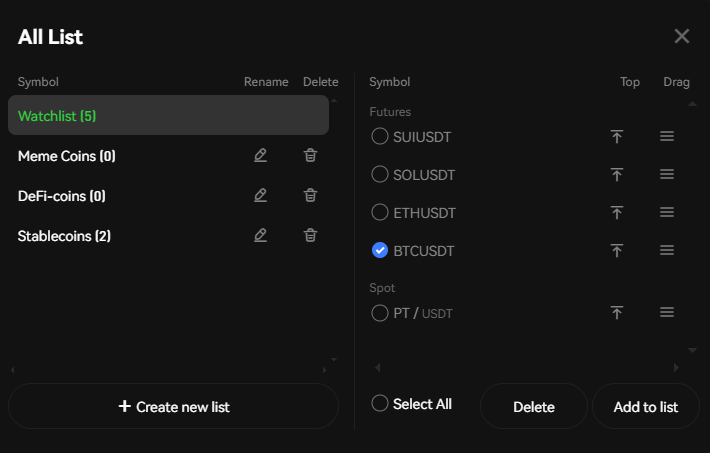
This is a basic but rare option, for which we give 7.5/10. Perfect for those who like to sort coins into categories.
Adjustable Slippage
Here you can set the permissible slippage level for different pairs and market orders. This means you set the percentage for how much the price can change, and if it moves beyond this limit, the trade won't execute!

This feature is located in the settings menu. It greatly helps when trading volatile and low-liquidity pairs. Overall, a purely practical feature that helps save on slippage. Rating - 8 out of 10.
OCO Orders
The fourth feature is called OCO orders (One Cancels the Other). This is a pair of linked orders: for example, you simultaneously place a limit order to buy BTC at $85,000 and a conditional order to buy at $87,000. Once one of them is triggered, the other is automatically canceled. This saves time and reduces the risk of double entry.

We've seen this feature on other exchanges, but it's still useful. Rating - 7 out of 10.
Chart Synchronization
The fifth feature is cross-platform synchronization for TradingView. It's simple: no matter what device you use to view your TradingView charts, they will be synchronized with the exchange and up-to-date.

This is the cherry on top, attention to detail that other exchanges might not even think about. We give this feature an 8 out of 10. But let's also state the drawbacks right away.

Now let's consider trading capabilities.
Here you have spot trading (simple trading at current prices), futures trading (trading contracts with leverage up to 100x). And separately, the Onchain feature - trading meme-coins, carried out in a convenient interface without the need to connect wallets to blockchain networks.
Trading
In terms of trading, here you also have:
| Feature | Essence |
| Buy/Sell for Fiat | Fiat deposits from a bank account, buying crypto with a card, P2P trading. |
| Exchange/Conversion | Direct conversion of one coin to another. |
Card features do not work in all regions.
Bots and Passive Income
Bots and copy trading can generate income, but can also drain your deposit - test on demo and control risk.
| Feature | Essence |
| Trading Bots | Automatic bots for spot and futures trading (e.g., grid bots). |
| Copy Trading | Automatically copying strategies and trades of experienced traders. |
| Phemex Earn | Platform for passive income: savings accounts and Launchpool. |
| Lending | Ability to take loans using crypto as collateral without selling it. |
Education and Tools
The trading simulator will help you test your strategies.
| Feature | Description |
| Trading Notes | Keeping a trade journal and analyzing your trading. |
| Demo Account | Trading simulation for learning and practice without risk. |
| Academy | Educational materials on trading, DeFi, and technical analysis. |
And now let's move to practice. To do this, let's register an account.
Registration and Verification
To start trading on Phemex, create an account to receive welcome bonuses.

Go to the link, and you'll land on the Phemex registration page, where you'll see details of your welcome rewards.
Register your account using email or Google, Twitter, Wallet Connect, MetaMask, or Telegram accounts.
Verification (KYC)
On Phemex, you can trade without KYC if you only deposit crypto (BTC, ETH, USDT, etc.). The limit is 2 BTC for withdrawal per day. However, without verification, there is no access to fiat and card purchases.
How to Trade
Here you have both automatic trading via bots, futures, and simple spot trading. Let's start with that.
Spot Trading on Phemex
Start with spot trading - it's the safest way for beginners. First, select a trading pair on the left side of the screen, for example BTC/USDT (the most popular). Click on the line menu to see hundreds of available trading pairs.

Now let's look at the chart.
How to Configure Charts
In the center of the screen, you'll see charts that you can customize as you wish. For example, to have each candle display price movement for one day, click the D button.

A green candle means growth for the day, red means decline.
Using the Indicators button, apply any indicators to the chart, for example, Bollinger Bands or moving averages.

To remove them, hover over them and close each indicator, or close them all at once.

You can also view the order book depth for buy and sell orders on the chart.
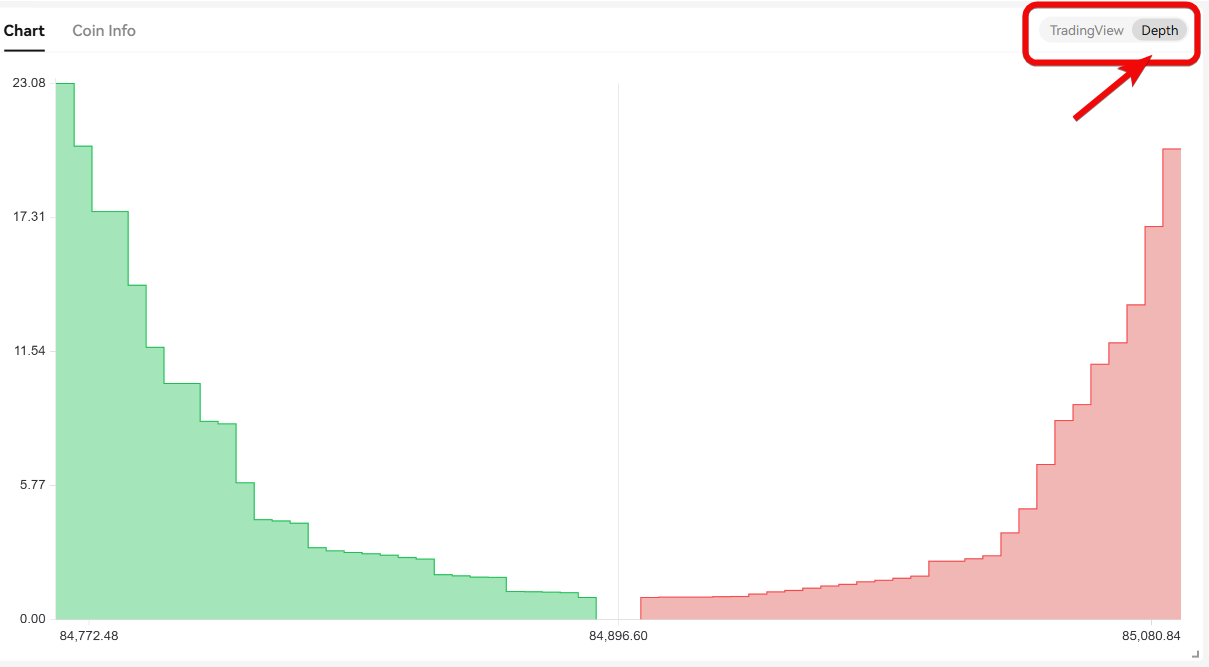
Those familiar with TradingView already know these indicators.
Orders and Market Analysis
Also, pay attention to the order book on the right, where buy and sell prices are visible, and the list of recent trades, showing high activity on the exchange.

Further to the right is where you place buy and sell orders.

Here you can also choose the order type: limit or market. These two types suit most users.
Example of Buying Bitcoin
The simplest way is to use a market (Market) order to buy BTC.

When choosing a market order, the trade executes instantly after clicking the Buy BTC button.
You've learned the simplest basics of trading. Now let's see what trading bots are available. This is a more advanced step.
Automatic Trading (Bots)
Phemex also offers automatic trading using bots, located in the Futures and Trading Bots sections.
Spot Grid Bot
For example, the Spot Grid Bot automatically buys at lows and sells at highs 24/7.
You can see how the bot buys at a low price again and again, then sells for a profit, locking in the first profit, second, and third, as shown on the chart.

On the right, you'll find bot configuration options.

You can choose automatic parameters or manually set the price range. However, often a direct Bitcoin purchase turns out to be more profitable. And here's why.
Experience shows that in most cases, simply buying and holding BTC (or buying small amounts periodically) yields more profit than trying to catch every small price movement with bots. Yes, you can configure a bot to buy slightly cheaper and sell slightly higher, but experience says that DCA is more profitable.
Futures Grid Bot and Other Bots
The Futures Grid Bot is associated with higher risks, especially when using leverage up to 100x. This is madness and, of course, not recommended due to extreme volatility.

The next bot is the Futures DCA (Martingale). It can also generate profit, but the risks are generally higher than with a direct Bitcoin purchase.
Based on trading experience, the risks with futures smart botting are often much higher compared to a direct BTC purchase, and the profit may still not justify the risk.
The Signal Trading Bot is an interesting option, allowing you to automate trading based on signals. This is a highly customizable bot: you can specify when it will buy and sell and connect it to TradingView via a webhook.
In our exchange reviews, we've already discussed how to use signal bots, but they are more suitable for advanced or moderately experienced traders, as beginners may find it difficult to figure them out.
Bitcoin DCA Bot
The best bot here is the Bitcoin Spot DCA. It is used for dollar-cost averaging Bitcoin. Simply click DCA, then Create, select the amount, click Create now - and the bot will start working immediately.
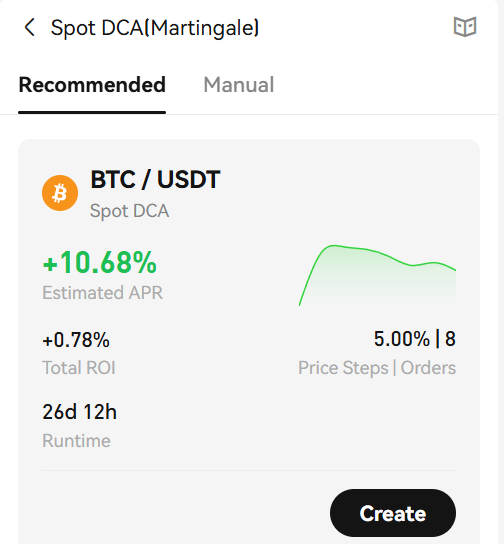
This is the best bot for 99.9% of people because its strategy is relatively safe.
Margin Trading, Loans, and Copy Trading
For margin trading on Phemex, use the Margin Trading section with leverage up to 5x.

Bitcoin is often used as collateral.
Loans and Condition Comparison
The borrowing rate on Phemex exceeds 9%, while on Bybit and Binance you can find more favorable fixed rates.

It's best to compare conditions on different platforms and avoid high risks by keeping leverage low. You can also use cross-margin for quick leveraged trading.
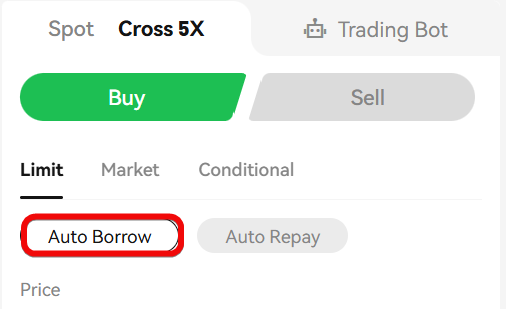
Click Cross 5x, select Auto Borrow, specify the amount, and trade. But it's important to compare conditions: sometimes margin trading, sometimes crypto loans are more profitable.
Futures and Copy Trading
Another method is direct futures trading on Phemex, where successful trades sometimes occur - $2.478 USD.

How to trade here? Select a trading pair, collateral, leverage, click BTC long.

Copy Trading
In the Copy Trading section on Phemex, unfortunately, only futures copy trading is presented, which is associated with high risks and often leads to losses for beginners.

Spot trading is safer in this regard. For spot trading, copy trading is available on Bybit and Bitget exchanges.
We also have guides for other exchanges with copy trading:
| Article | What the article is about |
| Copy Trading on Bybit Exchange | A complete guide on starting to copy trades of successful traders |
| Guide to Copy Trading on BingX Exchange | Basics of copy trading on BingX exchange |
Comparing Phemex with Competitors
When comparing Phemex with Bybit and Binance, we can say that Phemex is also good for accumulating BTC through spot trading.
However, it lacks some features: for example, spot copy trading and broad P2P trading capabilities like on Bybit.
Ease of use and liquidity are also better on Bybit and Binance. Bybit is considered the most convenient platform thanks to its bots and card.
Criticism
Trading on Phemex with high leverage in futures and margin is extremely risky and can lead to rapid loss of capital. Furthermore, let's highlight the drawbacks.
| Drawback Category | Problems |
| Trading Conditions | Limited selection of assets and pairs (loses to Binance/Bybit). High fees for regular users. Lower liquidity → wide spreads and worse prices. |
| Withdrawals | Slow withdrawals on a schedule, no instant transactions. |
| Support and Security | Support only via email and responds slowly. Complaints about withdrawal delays and manipulation in futures. Frequent technical issues (lags, PnL errors, order problems). |
| Feature Limitations | Outdated P2P market (few assets). No OTC deals for Russian citizens. |
Whether to trade on Phemex or choose another platform from our cryptocurrency exchange rating is, as always, your decision.


