Telegram Wallet: A complete review, security, and feedback

Doesn't give you the keys to your wallet, requires identity verification, high fees for p2p and exchange, technical errors.
The wallet is built right into the messenger and works via a bot. No separate installation required.
Overview
Telegram Wallet is a cryptocurrency wallet built directly into the Telegram messenger. It allows you to store, send, and grow your assets without leaving the chat client.
The wallet works on both smartphones and the PC version of the messenger and exists as the official @wallet bot.

It features functions such as: sending coins to your Telegram contacts, buying/selling with a bank card, P2P trading, and earning yield on deposits (staking).
It supports a vast number of cryptocurrencies and tokenized stocks. There are over 180 cryptocurrencies, including 8 major blockchains (TON, TRX, BTC, ETH, SOL, XLM, FLR, MON), 59 tokenized stocks and ETFs, and 80+ trading assets. Here are the most popular ones:
| Network | Tokens |
| Toncoin (TON) | TON, USDT, NOT, DOGS, HMSTR, X Empire (X), Catizen (CATI), Major (MAJOR), TAC, Tether Gold (XAUT) |
| Tron (TRC-20) | USDT, TRX |
| Bitcoin (BTC) | BTC |
| Ethereum (ETH) | ETH, 1INCH, AAVE, ACH, AEVO, APE, ARB, ARKM, ATH, AXS, BAL, BAT, BEAM, BICO, BIGTIME, BIO, BLUR, CHZ, COMP, CRV, CVC, CVX, EIGEN, ENA, ENS, ETHFI, FET, FF, FXS, GLM, GRT, ID, ILV, JASMY, LDO, LINK, LPT, LRC, MASK, MEME, MNT, MOG, MORPHO, MOVE, NEIRO, OM, ONDO, PENDLE, PEPE, PHA, POL, RPL, RSR, SAFE, SHIB, SKL, SNX, SPX, SSV, STORJ, SUSHI, TURBO, UMA, UNI, USDT, WAXP, WLD, WLFI, WOO, XAUT, YFI, YGG, ZRO, ZRX |
| Solana (SOL) | SOL, ACT, BOME, BONK, GRASS, JTO, JUP, ME, MEW, PENGU, PNUT, PUMP, PYTH, RAY, TNSR, TRUMP, USDT, W, WIF |
There are 2 types of wallets in Telegram:
Crypto– this is the built-in Telegram wallet, which is the focus of this guide.TON– this is a wallet only for the TON blockchain. We will cover it in a separate guide.

What's the difference between these wallets?
|
Parameter |
Crypto (this wallet) |
TON (specific) |
|
Purpose |
Universal wallet for multiple cryptocurrencies |
Wallet only for Toncoin (TON) |
|
Supported Assets |
BTC, ETH, USDT, USDC, and other popular crypto |
Only TON and TON-standard tokens |
|
Blockchain |
Multi-chain (different networks) |
Only The Open Network (TON) |
|
Keys |
Does not provide keys to the user |
Provides keys for the TON blockchain |
Let's start with the most important aspect of any crypto wallet – security.
What are the security features and functions here?
It's important to note that this wallet does not provide you with the keys to your assets. This is a so-called custodial wallet – it stores your funds in its own account. This is the main and biggest security vulnerability.
The wallet in Telegram is linked to your messenger profile - therefore, the security of your funds directly depends on the protection of your Telegram account itself. If your account is hacked, malicious actors automatically gain access to the wallet as well.
You can protect yourself in several ways.
Security:
- Two-factor authentication (2FA) – when logging in from a new device, Telegram will request SMS confirmation.
- Passcode - even if your unlocked phone or account falls into the wrong hands, a malicious actor cannot withdraw funds without this code.
- Biometrics - Face ID or fingerprint – an alternative to a passcode for protecting the wallet.
Attention! Be extremely careful with the Two-factor authentication option. In some countries, mobile operators may stop sending SMS messages for the messenger. In newer versions of the app for iOS and Android, the ability to log in via an access key (Passkey) has appeared. This setting can be enabled in the "Privacy" section. In the PC version, you need to enable login via email instead of SMS.
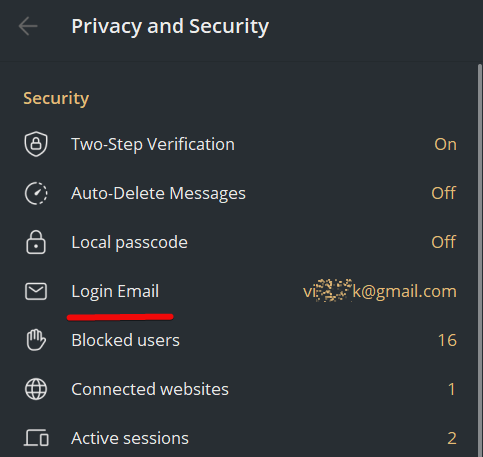
And although the developers hint that keys are stored using advanced MPC and TSS technology, the official Telegram Wallet documentation does not disclose the full technical scheme.
The bottom line on security is this: Telegram Wallet is only suitable for small daily operations and transfers within the messenger. For storing large amounts, non-custodial wallets are highly recommended – Tonkeeper, Ton Space, or cold wallets, because in them you personally control your keys.
Wallet Economics:
- P2P Market – allows you to exchange crypto directly between users. Telegram acts as a deal guarantor, and funds are temporarily frozen until the deal is confirmed by both parties.
- P2P Express – a simplified version for beginners. Telegram automatically selects the rate and seller.
- Quick Swap - allows you to instantly convert one coin to another within the wallet (e.g., exchange USDT for TON or BTC).
- Instant transfers to contacts - the sending process looks as simple as sending a message or a sticker.
There are also additional features:
- Staking and bonuses – offers the ability to hold assets (USDT or TON) and earn passive income (APY up to 50% during special promotions).
- Tokenized assets - the ability to invest in tokenized stocks (e.g., Tesla, Apple) and gold directly in the wallet interface.
However, all these functions do not work as smoothly as claimed. So, let's look at all these functions in practice. To do this, we'll set up the wallet.
How to download and install?
If you go to the official website of the TON cryptocurrency (the official cryptocurrency from Telegram), - the Wallet is recommended first.
To start using it, enter @wallet in the search bar in Telegram and go to the wallet marked with a blue checkmark, as it confirms its official status.
Alternatively, you can go to the wallet from the official website or from the messenger's menu itself.

After clicking, a bot will open in Telegram. To launch it, press the Start button, and then Get Started.

How to create a new wallet?
The wallet is created automatically when you press the Get Started button. To start using it, you need to do the initial setup.

Now let's analyze the interface and its functions in detail, step by step.
How to use it?
On the main screen, you will see the balance and 4 main buttons: Transfer, Deposit, Withdraw, and Exchange.
But to start using the wallet fully, you need to complete 3 steps.

- Set a passcode: select this option, enter and confirm the password.
- Add a recovery email, which will be needed to reset the password in case of loss. After entering the email address, click
Next, enter the received code, and the password will be set. You will use this code to confirm various operations in the wallet. - Add your data. Click
Provideso the wallet gets access to the phone number linked to your Telegram account.

Then enter your first name, last name, date of birth, and click Confirm & Finish.
After entering the data, a notification will appear that the limits have been increased: the overall limit for incoming transactions is 1,000 euros, but the P2P Market will only become available after identity confirmation, i.e., verification.
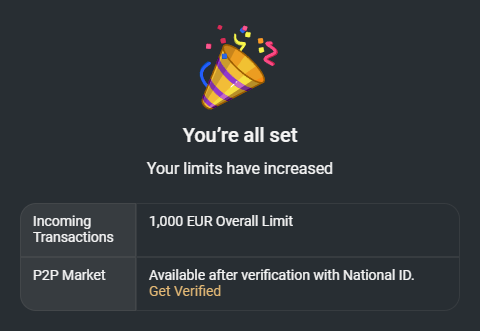
Is verification necessary?
This is a custodial wallet, so verification is required to work with it. It is needed so that in case of problems, support can help restore access, since the keys are stored by the service.
Attention! Attempting to specify incorrect residency to bypass restrictions leads to immediate account blocking, which cannot be contested with support!
Nevertheless, at the initial stages, you can work without verification if you stay within the limits of up to 1,000 euros. Click Next, and you will have one last option to complete the setup - purchasing cryptocurrency.
How to top up and get an address?
You can buy cryptocurrency in 4 ways:
- Via P2P Express
- Via P2P Market
- With a bank card,
- By depositing crypto from another exchange.
The most convenient is the last method because bank cards do not work in all regions.
To top up the wallet, click Crypto Deposit, select the coin, and copy the address.

Then go to a cryptocurrency exchange. For example, on the Bybit exchange, select "Withdraw - TON - TON network", paste the wallet address, specify the amount, and confirm.

Funds will arrive in 2–3 minutes.
It's important to remember that each blockchain has a unique address. For example, if you top up via BTC or USDT, the addresses will be different in different networks.
What are the fees?
Fees depend on the type of operation, the chosen network, and your role - a regular user or an ad creator in the P2P market.
- Transfers within Telegram – when you send cryptocurrency (USDT, TON) to other users – are free. No fee is charged.
- P2P Market (buying and selling) - when buying cryptocurrency through an existing ad, you do not pay a fee. You simply transfer money to the seller's card. However, if you create your own buy or sell ad, the service takes a fee - 0.9% of the deal amount.
Attention! Beware of the P2P Express option. Formally, a fee may not be indicated, but the exchange rate often contains a hidden markup of 2-3%.
External transfers to other wallets and exchanges
The withdrawal fee is fixed and depends on the blockchain network:
- TON network - transferring TON coins themselves costs fractions of a cent. Withdrawing USDT on this network will cost about 1 USDT.
- TRC-20 network (Tron) - this is the most expensive way to withdraw USDT. The fee ranges from 2 to 3.5 USDT per transaction.
Exchange and card purchase fees
- Internal exchange occurs at a less favorable rate than on exchanges. The difference is the hidden fee.
- Direct purchase of cryptocurrency with a bank card is not available everywhere. Payment system fees are added to the cost.
Fee comparison with alternatives
Compared to exchanges like Bybit, Telegram Wallet often loses. The purchase rate on P2P can be 1–2% worse, and withdrawal fees can be higher.
Read the guide on how to find profitable deals on Bybit P2P.
How to minimize fees?
- For USDT transfers, use the cheap TON network.
- Buy crypto through manual ad selection in the P2P market.
- Avoid P2P Express functions - they hide the real cost in the rate.
In summary: Telegram Wallet offers free internal transfers between contacts, 0% commission for buyers on the P2P market, and 0.9% for makers. It has fixed withdrawal fees: ~1 USDT on the TON network and 2–3.5 USDT on TRC-20, while hidden margins in exchanges and express purchases can reach 2–3% added to the rate. Because of this, the fees often become exorbitant.
How to use the P2P market?
On the P2P market, you can buy cryptocurrency directly from other people using dollars or euros. Telegram acts as a guarantor for deals. And this works without registering on complex external crypto exchanges.
The security of P2P deals is ensured by an escrow system. When a deal is opened, the seller's cryptocurrency is frozen by Telegram. It will only be transferred to the buyer after confirmation of receipt of money on the seller's card.
To make a purchase, click Deposit → p2p market → Buy, then select the cryptocurrency, for example, USDT, and the currency you will pay with, for example, Ruble.

At the top, there are filters with payment methods, where you can select a bank like Raiffeisen or a payment system.

Below you will see a list of sellers. Choose a reliable seller with a large number of deals and a high percentage of completed transactions. All sellers have different conditions, banks, and rates.
For example, let's click on one and look at the conditions.

- Seller – "Polite Dog" (317 deals, 100% positive feedback, online).
- You are buying - 85.796955 USDT.
- You are paying - 6,820 RUB.
- Rate - 1 USDT = 79.49 RUB.
- Payment method - SBP (Fast Payments System) to a YooMoney wallet.
- Time to pay - 15 minutes after the seller confirms the order.

As soon as the seller receives the money, they will release the cryptocurrency, and it will instantly be credited to your balance.
How to secure your P2P deals?
Access to P2P trading requires verification. The basic level requires full name and phone number. Specifying false residency - for example, living in Russia but presenting yourself as a US citizen - is extremely risky. This leads to account blocking without the possibility of recovery.
The "Verification Plus" level increases limits to 100,000 euros per day. For it, you need to provide a photo of your passport or ID card and pass a biometric check (selfie).
What are the fees and benefits?
Buying or selling using others' ads is free for you. If you create your own ad, the service charges a 0.9% fee on the deal amount.
Rates on the P2P market are usually less favorable than on major exchanges - the difference can be 1–3%.
What else is important to remember?
- Support responds slowly - sometimes within several weeks.
- Do not communicate with counterparties in personal chats outside the P2P interface.
- Never confirm receipt of money until you personally check the balance in your bank account.
How to make an exchange?
The exchange allows you to instantly convert some assets into others without leaving the messenger.
The Exchange button is located in the wallet's main menu next to the top-up and send options. The main available pairs are Toncoin (TON), Bitcoin (BTC), and the stablecoin USDT. Sometimes other tokens appear in the list, for example NOT, DOGS, or tokenized assets.
To make an exchange:
- Select the coin you are exchanging
- Select the coin you are exchanging to
- Review the conditions and confirm the exchange.

Here you pay hidden fees through the spread (difference in rates). This makes the exchange unprofitable for amounts above $10 compared to exchanges like Bybit.
How to earn passive income from staking?
Telegram Wallet gives you the opportunity to earn passive income directly in the messenger interface – the Earn or Bonuses section.
What is the yield and which assets are available?
The available programs are regularly updated. Here are the main directions:
- Staking USDT. This offers 9% annual yield for amounts up to 3000 USDT.
- Staking Toncoin (TON). The native network coin can yield from 3.8% to 8% annually.
- Other tokens. There are temporary offers, for example, high interest on XLM for new users or programs for MON and digital gold.

How to start?
The process involves several steps.
- Go to the
Earn(Bonuses) section in the wallet menu. - Top up the bonus account by transferring funds from the main wallet.
- Receive rewards. They are often paid out in TON, even if you are staking USDT. Your final profit will depend on the TON rate.
- You can close the deposit at any time in the
Earnsection. The principal amount will return to the wallet, and the accumulated rewards will remain with you.
What are the risks and limitations?
Consider important nuances before participating.
- Technical failures. Users sometimes encounter errors, for example, when trying to collect rewards.
- Short terms. High percentages often apply to a limited amount and for a short period - for example, 2 weeks or a month.
- Possible blocking. Unlike a bank deposit, funds may be blocked for the duration of the promotion without early withdrawal.
- Counterparty risk. Wallet is a custodial wallet managed by a third-party company. There is always a risk of technical work or fund freezes.
For more stable income and flexible conditions, consider staking on major exchanges like Bybit. There, the yield on USDT is often higher and support is more responsive.
How to withdraw or send crypto to a contact?
To withdraw to another crypto wallet, click Withdraw, paste the recipient's address, and confirm.
For a safe payment to exchanges, you need to fill in the Tag/Memo field. These fields are on the exchange in the deposit section for the required coin.

To transfer coins to your contact within the messenger, click Transfer and select the recipient from the list.

Transfers between contacts are commission-free.
How to trade tokenized assets?
The wallet offers trading in RWA assets. For example, Tesla, Apple, Nvidia - and gold. This trading is available not in all regions and requires verification.

It's encouraging that there is a mechanism where dividends are automatically reinvested in purchasing additional shares of the asset (auto-claiming).
What to consider?
Rates inside Telegram are often 1–3% worse than on major exchanges. Technical support responds slowly and is practically absent. Resolving disputes takes from several days to months.
How to recover the wallet?
Recovering the custodial @wallet via the account is possible but strictly limited to access to the original Telegram ID and phone number.
If the account is deleted/recreated - the wallet is inaccessible because Telegram will not give you the keys. And without access to the number/email – the funds will be lost forever.
Contact support@wallet.tg with the wallet address and proof (but there are no guarantees).
What are the disadvantages of this wallet?
The fundamental disadvantage is the custodial nature of this wallet, as already noted in the "Security" section. You do not own the private keys or seed phrase - they are stored on Telegram's servers. Technically, the funds belong to third parties, and you only get access to them through the interface.
There have been cases where Telegram froze assets, requiring verification or proof of the origin of the money.
For those who count their money, the wallet loses to exchanges. Buying crypto through the P2P market is often 1–3% more expensive. Internal exchange occurs at an inflated rate. The fee for withdrawing USDT on the TRC-20 network is about 2–3.5 $, which is higher than on many exchanges!
Withdrawing USDT via Telegram Wallet costs $3.50 on the Tron network and $4 on Ethereum, while the actual network fees are $0.50–$1 (at most $1.50). For Solana, the wallet charges $1.50, when the real withdrawal cost on that network is just pennies. The markup on a single transaction sometimes reaches 300–800%.
Moreover, although the wallet seems anonymous, verification is mandatory for many functions. A frequent reason for blocking is attempting to specify false residency. The system detects discrepancies and can block the account permanently.
It seems even more strange that Pavel Durov stated that Wallet is not a Telegram product, but merely an integrated third-party service. There is no clear information about the developers in the public domain, and this reduces trust among professional investors.
The user agreement of the @Wallet bot states that
"it is not considered part of Telegram, although integrated into the messenger's functionality."
Users also report mass technical failures:
- "
Something went wrong" errors when trying to collect staking rewards. - Sudden session expiration (
session expired) during transaction confirmation. - Transaction freezes for 24 hours or more even when transferring between own accounts (e.g., from Wallet to Ton Space).
Summary: is it worth using?
And although the wallet is convenient for small expenses and quick transfers to friends, we do not consider it safe. Recovery via email or phone number can never replace the established pillar of security – the seed phrase.
The wallet can be blocked at any moment, and Telegram support will not answer you. Users have reported waiting times for a response of up to 1.5 months!
In the end, for storing large amounts, this wallet is not suitable due to custodial risks, high chance of blocking, and slow support.
Whether to use this wallet or choose one from the comparison rating - the final answer is always yours. In the rating, we researched the security of over 100 crypto wallets.
Have a great day! Your editor - Maxim Anisimov for the website bytwork.com.
Wallet technical support:
- Bot in Telegram @wallet_supportbot
- support@wallet.tg
Disclaimer: All information provided in this article should not be taken as financial advice. The article was created for educational purposes. Never invest more than you can afford to lose, and seek advice only from your personal financial advisor.


